.svg)
Modular Office Workstations for Open Plan Offices: What Corporates Should Know
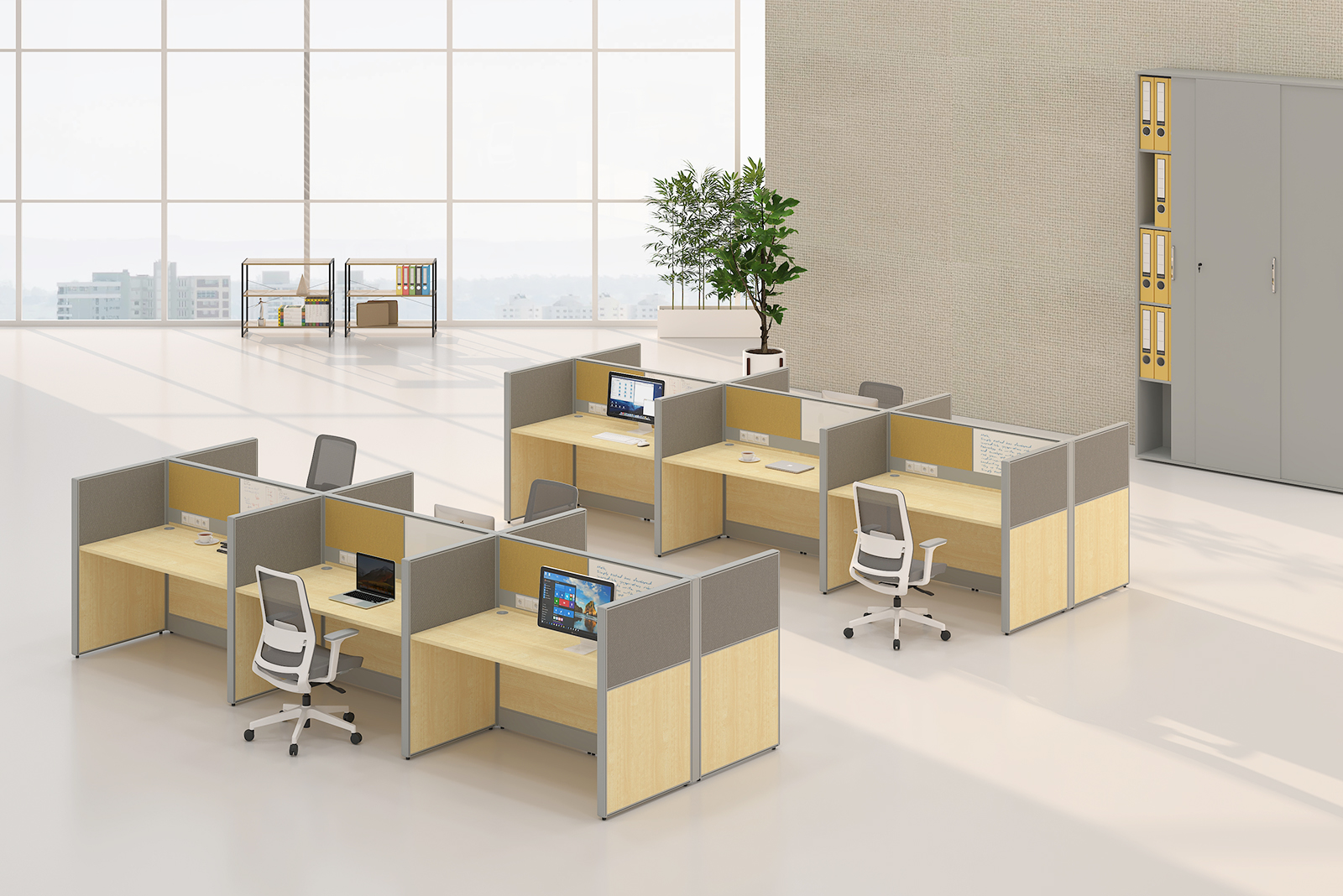
Planning a modular office workstation for open plan offices? This complete guide covers layouts, components, partition heights, and what to check before buying. By AFC Furniture Solutions.
A modular office workstation for open plan offices combines individual desking, partition screens, and storage into a flexible, reconfigurable workspace system. Corporates choosing modular systems can scale and reconfigure layouts as team sizes change without replacing all furniture. This guide by AFC Furniture Solutions covers the key decisions every office manager and facilities head should make before specifying modular office workstations for a corporate floor.
What Is a Modular Office Workstation?
A modular office workstation is a furniture system made up of interchangeable components including desktops, leg or panel frames, partition screens, and storage units. These components can be assembled in multiple configurations to suit different team sizes, floor shapes, and working styles.
Unlike fixed or custom-built furniture, modular systems can be reconfigured as the office layout evolves. Panels can be added, removed, or repositioned. Desktops can be extended or shortened. Storage can be integrated or separated depending on the available space.
AFC Furniture Solutions manufactures a full range of modular workstation systems for corporate clients across India, with configurations available for both small team setups and large open plan floors.
Why Open Plan Offices Benefit from Modular Systems
Open plan offices need furniture that supports collaboration without sacrificing individual focus. Modular workstations achieve this balance by combining shared or adjacent surfaces with partition screens that create visual separation between team members without full walls.
Corporate offices using modular systems benefit from faster installation timelines compared to custom joinery or built-in furniture. They also benefit from lower long-term costs, as individual components can be replaced or upgraded without discarding the entire system.
The ability to reconfigure is particularly valuable for growing businesses. A company that occupies a new floor with 30 workstations today may need 50 within two years. A modular system purchased from a consistent manufacturer can be extended by simply ordering additional components in the same finish and specification.
Key Components of a Modular Workstation
Understanding the components of a modular workstation system helps you specify the right configuration for your office and avoid under-ordering or over-specifying.
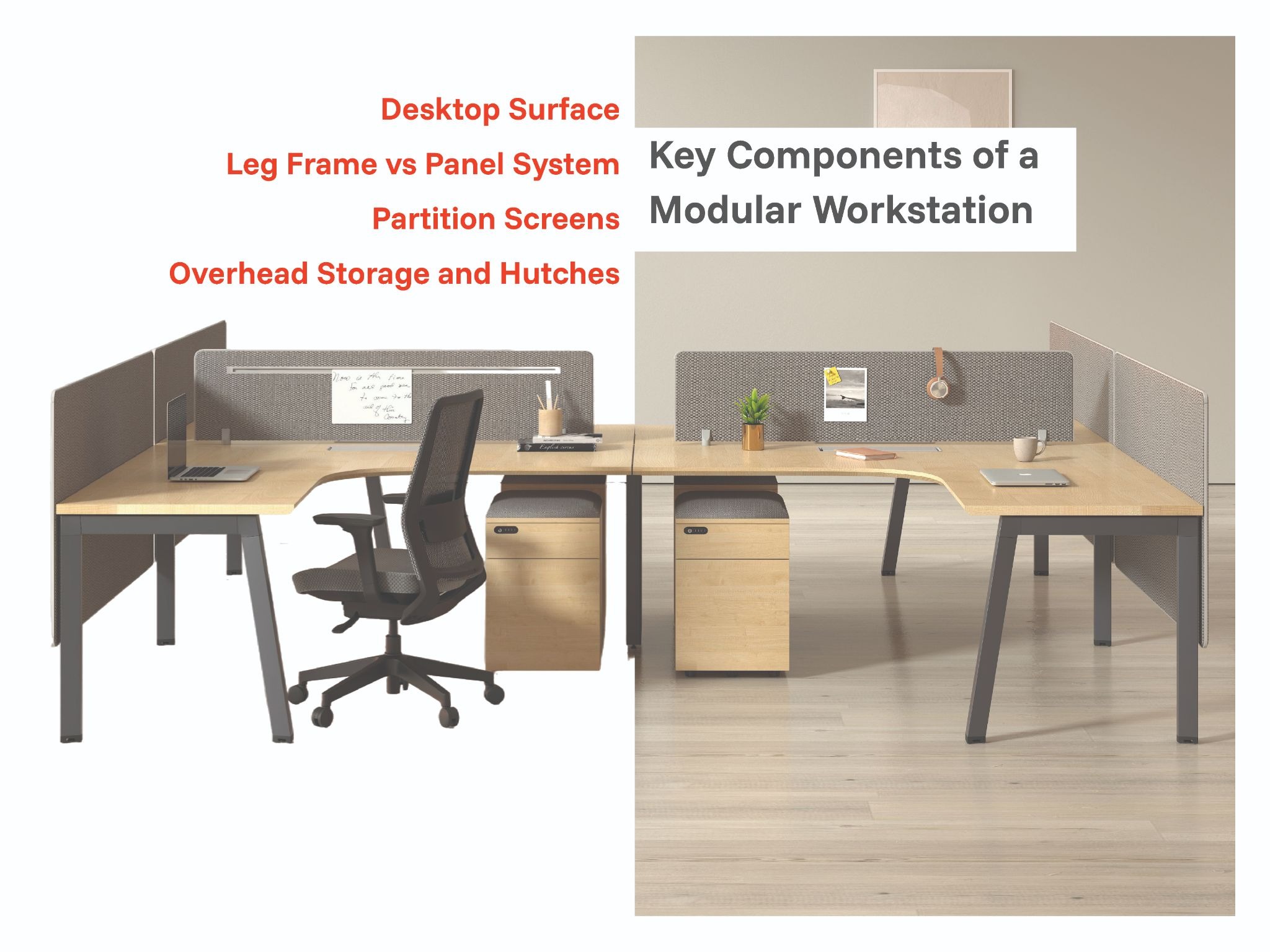
Desktop Surface
The desktop is the primary work surface. Standard corporate desktops range from 1200mm to 1800mm in width. Straight desktops suit linear or back-to-back arrangements. L-shaped extensions suit employees who need dual-monitor setups or require additional spreading room for documents and equipment.
Desktop depth is typically 600mm to 750mm. A 600mm depth is sufficient for a single monitor setup. A 750mm depth is recommended for larger monitors or employees who use physical documents alongside their screens regularly.
Leg Frame vs Panel System
Workstations use either a leg-based frame or a panel-based system. Panel systems are those where the desktop rests on tall vertical panels rather than individual legs. The advantage of panel systems is structural stability and the ability to mount partition screens directly to the panel without additional hardware.
Leg-based systems are lighter and faster to reconfigure. They suit offices that expect frequent layout changes. Panel systems suit offices where permanence and stability are more important than flexibility.
Partition Screens
Partition screens attach to the desktop edge or panel frame and provide visual privacy between adjacent workstations. Heights typically range from 400mm to 1200mm above the desktop surface.
Screen material options include fabric-wrapped panels, acrylic glass inserts, and solid laminate panels. Fabric-wrapped screens have the added benefit of absorbing ambient noise in open plan environments where sound management is a concern.
Overhead Storage and Hutches
Overhead storage units mount above the desktop level and provide document and personal item storage without using any floor space. These are particularly useful in open plan offices where desk footprint is limited and storage needs to be built into the workstation itself.
Hutch units typically include a lockable cupboard section and open shelving. Some configurations include a built-in power strip for charging devices directly from the overhead unit.
Workstation Layout Options for Corporate Offices
The layout you choose directly affects the number of workstations that fit on a floor, the amount of circulation space available, and how well the setup supports your team's working style.
Linear or Back-to-Back Layout
The most space-efficient layout for large open plan floors. Workstations are arranged in rows, either all facing the same direction or back-to-back with a shared partition panel between pairs.
This layout suits high-density teams such as sales, customer support, finance, and data processing teams where individual focus is the priority and most interaction happens through screens or headsets rather than face-to-face.
L-Cluster or Pod Layout
Groups of four to six workstations arranged in an L-cluster or pod formation. This layout balances individual focus with team visibility and suits cross-functional teams that collaborate regularly throughout the day.
Pod layouts use slightly more floor area per workstation than linear layouts but create a stronger sense of team identity and make informal communication more natural without interrupting the wider office.
Spine Layout
A central aisle runs the length of the floor with workstations branching off on both sides. This layout maximises access to natural light from perimeter windows and creates clear circulation routes down the centre of the floor.
Spine layouts are particularly well-suited to narrow floor plates or floors where the window line is on two parallel sides of the building.
Partition Height and Privacy Levels
Partition height is one of the most consequential decisions in any open plan workstation specification. The height you choose sets the visual character of the entire floor and determines how much acoustic and visual separation exists between team members.
400mm to 600mm above desktop: Maintains full visual openness across the floor. Suited to creative, collaborative, or customer-facing teams where visibility and easy communication are priorities.
800mm to 1000mm above desktop: Provides seated privacy while maintaining an open feel when standing. This is the most commonly specified height in corporate open plan offices in India, as it balances individual focus with openness.
1200mm and above: Near-full standing privacy. Suited to roles requiring sustained concentration, confidential conversations, or sensitive data handling. This height effectively creates a semi-enclosed workspace without a full floor-to-ceiling wall.
Cable Management in Open Plan Setups
Cable management is consistently the most overlooked aspect of open plan workstation planning and becomes the most visible problem after installation.
Every workstation position needs power and data access. Built-in cable trays beneath the desktop surface route cables horizontally along the workstation run. Grommet holes in the desktop allow cables to pass vertically from the equipment down to the tray. Floor box access points bring power and data up from the sub-floor to the workstation positions.
All three of these elements need to be planned before the furniture is ordered and before any floor works are complete. Retrofitting cable management after installation is significantly more expensive and results in exposed cable runs that are both a hazard and an aesthetic problem.
AFC Furniture Solutions workstation systems include integrated cable management as standard on all panel-based configurations. Leg-based systems are available with desktop cable trays as an add-on specification.
Storage Integration with Workstations
Each workstation in an open plan office should have access to at least one personal storage unit. The format depends on the available floor area and the nature of the work.
Under-desk mobile pedestals on castors are the most flexible option. They fit beneath the desktop when not in use and can be moved easily when the layout changes. Most mobile pedestals include a box drawer, a filing drawer, and a lockable cupboard.
Fixed-height pedestals sit permanently beneath one end of the desktop and provide more robust storage than mobile units. They are better suited to users who store heavy files or equipment at their workstation.
For open plan offices with limited floor area, shared mid-height storage units placed between workstation clusters reduce individual desk footprint while maintaining adequate storage per person.
Pairing the right storage with ergonomic office chairs for workstations is important. The pedestal height and position should not obstruct chair movement or leg clearance under the desk.
How to Calculate Workstations Per Floor Area
A standard corporate planning benchmark allocates 4.5 to 6 square metres of gross floor area per workstation in a high-density open plan layout. This includes the desk footprint, chair clearance, and a proportional share of circulation aisles.
For a 1,000 square foot office (approximately 93 square metres), this gives a planning capacity of 15 to 20 workstations depending on the amount of space allocated to meeting areas, breakout zones, and support spaces such as print stations and storage rooms.
Always produce a scaled layout plan before finalising the workstation order. A layout plan confirms the configuration fits the floor, identifies column and window positions that affect placement, and gives the supplier the information needed to produce accurate component quantities.
AFC Furniture Solutions provides layout planning support for all corporate modular workstation orders as part of the procurement process.
What to Check Before Placing a Bulk Order
Before committing to a volume order for modular workstations, verify the following with your supplier:
Lead time: Modular workstation systems for large corporate orders typically require 4 to 8 weeks for manufacturing and delivery. Confirm the timeline before agreeing to an office fit-out schedule.
Finish consistency: If you are ordering in phases, confirm that the finish and laminate specifications will be available from the same batch for future orders. Colour variation between batches is a known issue with laminate finishes.
Installation scope: Confirm whether installation is included in the quote and what the supplier's responsibility is for waste removal and layout adjustments after delivery.
Warranty terms: Commercial workstation systems should carry a minimum two-year warranty on structural components. Confirm what is covered and the process for raising warranty claims.
Frequently Asked Questions (FAQs)
These are the most common questions corporate buyers ask when specifying modular office workstations for open plan offices.
Q1. What is the difference between a modular and a fixed office workstation?
A fixed office workstation is custom-built or joinery-based and cannot be reconfigured once installed. A modular office workstation is made up of standard, interchangeable components that can be assembled, expanded, and reconfigured as the office layout evolves.
Modular systems are preferred for corporate offices because they offer lower long-term costs, faster installation, and the flexibility to adapt to team size changes without full replacement.
Q2. How much floor area does one modular workstation require?
A single modular workstation in an open plan layout typically requires 4.5 to 6 square metres of gross floor area, including the desk footprint, chair clearance zone, and a proportional share of circulation aisles.
This figure varies depending on desktop size, layout type, and the amount of shared space such as meeting rooms and breakout areas on the same floor.
Q3. What partition height is best for open plan offices?
800mm to 1000mm above the desktop is the most widely specified partition height for corporate open plan offices in India. This height provides seated visual privacy while maintaining an open, spacious feel when standing.
For roles requiring higher concentration or confidentiality, 1200mm screens are more appropriate. For fully collaborative teams, lower screens of 400mm to 600mm keep the floor visually open.
Q4. Can modular office workstations be expanded after installation?
Yes. This is one of the primary advantages of a modular system. As long as the new components are ordered from the same manufacturer in the same finish and specification, workstations can be expanded by adding desktops, partition screens, and storage units to the existing configuration.
AFC Furniture Solutions maintains consistent finish availability across its modular workstation range to ensure seamless expansion for phased corporate fit-outs.
Q5. Does AFC Furniture Solutions supply modular workstations for corporate offices across India?
Yes. AFC Furniture Solutions manufactures and supplies modular office workstation systems for corporate clients across India. We offer scaled layout planning, volume pricing, pan-India delivery, and on-site installation support.
Contact the AFC Furniture Solutions team at +91 9999006933 or visit afcindia.in to discuss your floor plan and workstation requirements.
Tips for Buying Modular Office Workstations
- Tip 1: Always request a scaled floor plan from your supplier before confirming the configuration. A layout plan prevents installation day surprises and confirms component quantities before the order is placed.
- Tip 2: Specify all cable management requirements before ordering. Retrofitting cable trays and grommet holes after the workstations are installed is disruptive and costly.
- Tip 3: Order a minimum of 10 to 15 percent extra desktops and panels for future expansion. Reordering the same finish at a later date can result in a visible colour difference between old and new components.
- Tip 4: Choose powder-coated finishes over painted finishes on panel frames and metal components. Powder coating is significantly more durable under daily commercial use and resists chipping far better.
Bonus Points
- Bonus 1: AFC Furniture Solutions provides pan-India installation support for all modular workstation orders, including scaled layout planning, on-site assembly, and post-installation adjustments.
- Bonus 2: Modular workstation systems from AFC Furniture Solutions are fully compatible with standard ergonomic chair configurations, ensuring a coordinated and correctly dimensioned workspace.
- Bonus 3: For offices planning a phased fit-out, AFC Furniture Solutions modular systems allow you to start with a core configuration and expand with matching components as your team grows. Contact our team at +91 9999006933 to discuss your requirements.
Conclusion
Choosing the right modular office workstation for open plan offices requires careful planning across layout, partition height, cable management, and storage. A well-specified modular system adapts to your organisation as it grows and keeps your workspace efficient and professional for years without the need for full replacement.
AFC Furniture Solutions offers a complete range of corporate modular workstation systems with full design, installation, and after-sales support across India.
Explore Other Popular Blogs



Let’s build together
Tell us about your project and we’ll help you plan, design, and deliver at scale.
.jpg)