.svg)
How to Choose the Right Ergonomic Office Chair for Long Working Hours
Choosing the right ergonomic office chair for long sitting hours reduces back pain and boosts productivity. Read the complete corporate buying guide by AFC Furniture Solutions.
An ergonomic office chair for long sitting hours supports your spine, reduces fatigue, and improves focus throughout the workday. Choosing the wrong chair leads to back pain, poor posture, and lower productivity over time. This guide by AFC Furniture Solutions covers every key feature you need to evaluate before buying an ergonomic office chair for your corporate office.
What Is an Ergonomic Office Chair?
An ergonomic office chair is designed to support the natural curve of the spine and reduce physical strain during prolonged sitting. Unlike standard chairs, ergonomic models have adjustable components that adapt to the user's body shape and working posture.
The word "ergonomic" comes from the science of designing equipment to fit the human body rather than forcing the body to adapt to the equipment. In office seating, this means adjustable lumbar support, customisable seat height, and a backrest that moves with the user.
AFC Furniture Solutions manufactures a wide range of ergonomic seating solutions designed specifically for corporate use across India, combining durability with full adjustability for long working hours.
Why Long Sitting Hours Demand the Right Chair
Most corporate employees sit for 6 to 10 hours daily. Without proper support, this leads to lower back pain, neck stiffness, and reduced circulation in the legs over time.
The right chair distributes body weight evenly across the seat and backrest. It keeps the spine in a neutral position, with the natural S-curve maintained rather than flattened or exaggerated by a poorly designed seat.
Investing in the right ergonomic office chair for long sitting hours is not a luxury for corporate offices. It is a productivity and employee health decision with direct returns in reduced absenteeism and sustained daily performance.
Poor seating also leads to long-term musculoskeletal disorders, which are among the leading causes of workplace sick days in office environments. Addressing seating quality at the procurement stage is far more cost-effective than managing the consequences later.
Key Features to Look For
Not all ergonomic chairs are equal. The following features separate a genuinely ergonomic chair from a standard chair with an ergonomic label attached to it.
When evaluating chairs for bulk corporate procurement, use this feature checklist to compare models objectively and avoid purchasing on price alone.
Lumbar Support Explained
Lumbar support is the single most critical feature in any chair designed for long sitting hours. It fills the gap between the lower back and the seat back, preventing the spine from rounding forward into a slouch.
Look for adjustable lumbar support that allows the user to position the pad at the exact height of their lower back curve. Fixed lumbar support works well only when the chair is purchased for a single user of a specific height.
For corporate offices purchasing in volume for employees of varied heights, always specify chairs with adjustable lumbar height and depth. A one-size lumbar pad that sits too high or too low is worse than no lumbar support at all, as it pushes the spine into an unnatural position.
The ideal lumbar pad should have both vertical height adjustment and forward depth adjustment. This ensures it maintains contact with the lumbar curve regardless of how the user positions themselves during the day.
Seat Height and Depth Adjustment
Seat Height
Seat height should allow the user's feet to rest flat on the floor with the knees at a 90-degree angle. If the seat is too high, the legs hang and press against the front edge, cutting off circulation to the lower legs.
If the seat is too low, the knees rise above the hips and create a forward pelvic tilt that collapses the lumbar curve. Most quality ergonomic chairs offer a pneumatic height adjustment range of 43cm to 55cm, which suits the majority of adult users in a corporate environment.
Seat Depth
Seat depth controls how far forward the backrest sits from the front edge of the seat. The correct setting leaves a two to three finger gap between the front edge of the seat and the back of the user's knees.
Too little depth means the backrest pushes the user forward with no lumbar contact. Too much depth means the front edge presses into the back of the knees and restricts circulation over long sessions.
Seat depth adjustment is found in mid-range to premium ergonomic chairs and is particularly important for taller or shorter users who fall outside the average sizing most standard chairs are built for.
Armrest and Headrest Options
Armrests
Armrests support the forearms and reduce tension in the shoulders and upper back during long working sessions. They should be height-adjustable at a minimum, allowing the arms to rest at elbow height without forcing the shoulders to hunch or drop.
4D armrests adjust in four directions: height, width, depth, and pivot angle. These offer the greatest flexibility for different desk heights and individual body proportions. For corporate bulk purchases, 2D or 3D armrests offer a practical balance between adjustability and cost.
Armrests that are too narrow or made from hard plastic cause forearm pressure during extended use. Look for armrests with a soft polyurethane or foam-padded surface, particularly for users who rest their arms on the chair for several hours each day.
Headrest
A headrest is essential for employees who spend long hours on video calls, reading screens, or working with documents. It supports the cervical spine and reduces neck strain that accumulates over a long working day.
The headrest should adjust independently in both height and forward tilt. A headrest fixed at a single position will push the head forward for users of different heights, which creates neck strain rather than relieving it.

Mesh vs Foam for Long Hours
The backrest and seat material directly affects both comfort and durability in long-use commercial environments.
Mesh backrests allow constant airflow and keep the user cool throughout the working day. In warm office environments across India, high-quality mesh is generally the preferred material for all-day corporate use as it prevents heat and moisture build-up that occurs with foam-backed seats.
Foam backrests provide firmer, denser support. They are better suited to colder environments or users who prefer a structured, non-yielding feel against the back. High-density foam retains its shape under sustained commercial use far longer than standard foam.
For seat cushions, high-density foam is the correct specification for office environments. Memory foam compresses too readily under sustained sitting pressure and retains body heat, making it uncomfortable for long working sessions in warm offices.
How to Test a Chair Before Buying
When evaluating a chair for corporate procurement, always request a sample unit before placing a volume order. A chair that looks well-specified on paper may feel entirely different after 30 minutes of actual use.
The sit test: Sit in the chair for at least 10 minutes without adjusting anything. Check that the lumbar pad naturally reaches your lower back and that there is no pressure building under the thighs from the seat front edge.
The adjustment test: Operate every adjustable component without leaving the seated position. Height, backrest recline, armrests, and lumbar should all adjust smoothly and hold position reliably with one hand during use.
The material test: Press the seat cushion firmly and release. A good-quality commercial seat should not compress to the base within five to six seconds. Check the mesh backrest for sharp frame edges or loose weave at the junction points.
The stability test: Apply lateral pressure to the backrest while seated. The chair should not wobble or flex at the base join. A five-star base with dual-wheel casters is the standard for commercial stability on both carpeted and hard floors.
Pairing Your Chair with the Right Workstation
Even the best ergonomic chair performs poorly when the office workstation setup around it is not correctly aligned. The desk height, monitor position, and keyboard placement all directly affect how the chair supports the body during the working day.
If the desk is too high, the user raises their arms and shoulders above elbow height regardless of armrest adjustment. If the monitor is too low, the user bends their neck downward throughout the day, which no amount of headrest adjustment can fully compensate for.
AFC Furniture Solutions designs workstation systems that complement ergonomic seating for a fully aligned corporate workspace. Specifying the chair and desk together, rather than separately, is the most effective way to reduce workplace fatigue and protect employee wellbeing over the long term.
Common Mistakes Corporates Make When Buying Ergonomic Chairs
Understanding what to avoid is just as important as knowing what to look for. These are the most common purchasing mistakes in corporate ergonomic chair procurement.
Buying on price alone: The cheapest ergonomic chair in the market is typically a standard chair with a curved backrest. Genuine ergonomic functionality requires adjustable components that carry a real manufacturing cost. Budget-only procurement leads to replacement orders within 12 to 18 months.
Ignoring the weight capacity: Many buyers overlook the chair's rated weight capacity. A chair rated for 90kg placed under a 110kg user will fail the mechanism within months of deployment, voiding the warranty.
Specifying one model for all roles: A chair for a data analyst who sits for eight hours with minimal movement has different requirements to a chair for a sales manager who is frequently in and out of their seat. One model for all roles is rarely the right answer for large corporate offices.
Skipping the trial unit: Ordering in volume without testing a sample unit is a significant risk. Always validate the chair under real-use conditions before committing to a bulk order.
Frequently Asked Questions (FAQs)
These are the most common questions corporate buyers ask when specifying ergonomic office chairs for long sitting hours.
Q1. What is the best ergonomic office chair for long sitting hours?
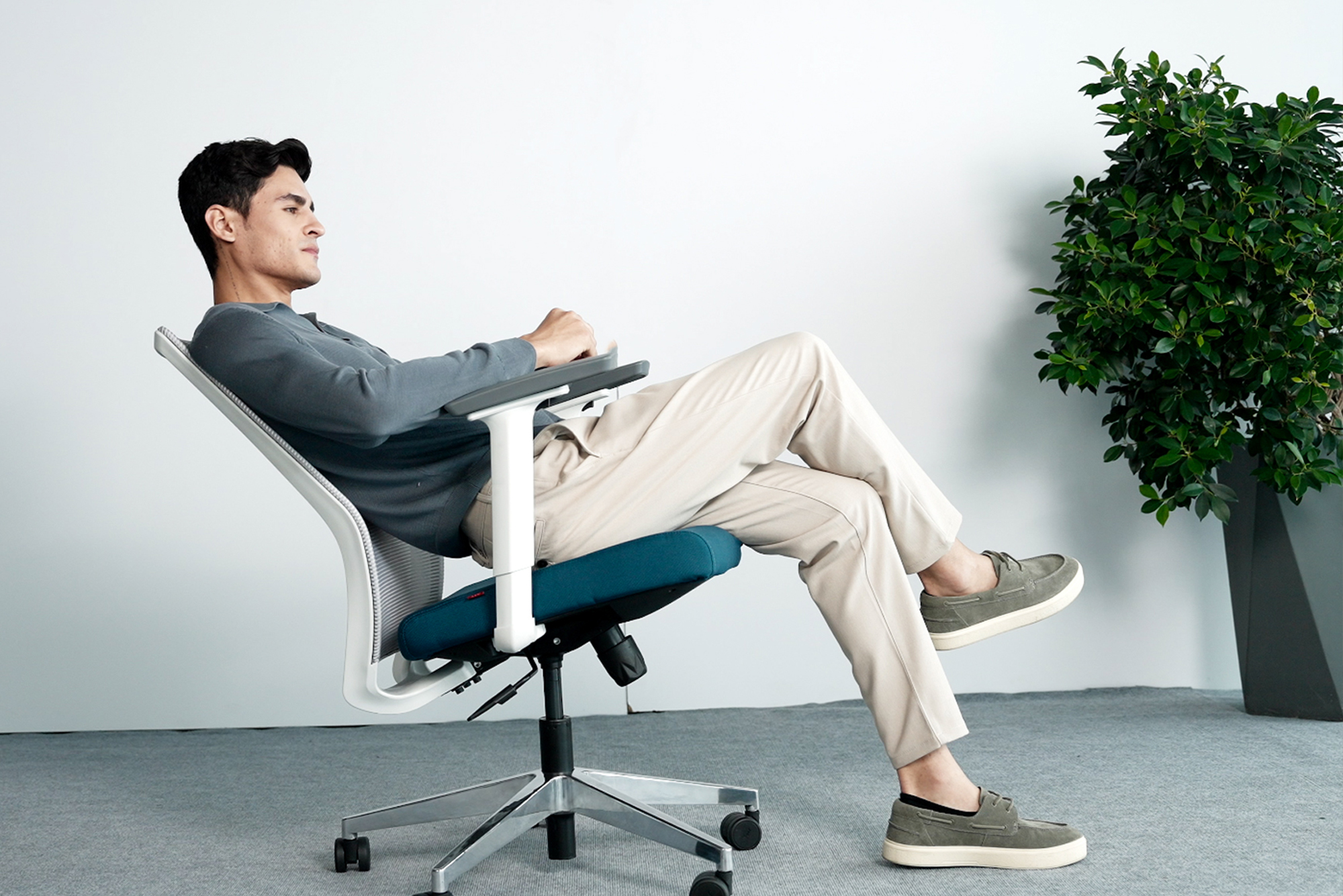
The best ergonomic office chair for long sitting hours is one that offers adjustable lumbar support, seat height, seat depth, and armrests. It should have a high-density foam or breathable mesh seat, a reclinable backrest with tilt tension control, and a five-star base for commercial stability.
For Indian corporate offices, a mesh-back ergonomic chair with fully adjustable lumbar support is the most recommended configuration, as it keeps the user comfortable and cool throughout long working sessions.
Q2. How long should you sit in an ergonomic chair before taking a break?
Even with the best ergonomic office chair, you should not sit continuously for more than 45 to 60 minutes without a short movement break. Standing up, stretching, or walking for 5 minutes every hour significantly reduces cumulative strain on the spine and lower limbs.
Ergonomic chairs reduce strain during sitting but do not eliminate the health risks of prolonged static posture. Regular movement remains essential regardless of seating quality.
Q3. What is the difference between a task chair and an ergonomic chair?
A task chair is a general-purpose office chair designed for short- to medium-duration use, typically with basic height adjustment and limited back support. An ergonomic chair is specifically designed for long sitting hours with a full range of adjustable components, including lumbar support, seat depth, armrests, and backrest recline.
All ergonomic chairs used in corporate offices are a type of task chair, but not all task chairs meet the criteria to be called ergonomic.
Q4. How do I know if my office chair has proper lumbar support?
Proper lumbar support fills the gap between your lower back and the seat back when you sit upright. You should feel a gentle, firm contact at the curve of your lower back without needing to lean back forcefully.
If you notice a gap between your lower back and the backrest in a natural upright position, the lumbar support is either insufficient or incorrectly positioned. The correct lumbar pad height typically sits between 5cm and 10cm above the seat cushion surface, depending on the user's height.
Q5. Does AFC Furniture Solutions offer ergonomic chairs for bulk corporate orders?
Yes. AFC Furniture Solutions manufactures and supplies ergonomic office chairs for bulk corporate procurement across India. We offer volume pricing, trial units for pre-order evaluation, and pan-India delivery with on-site installation support.
For bulk enquiries, contact the AFC Furniture Solutions team at +91 9999006933 or visit afcindia.in to explore the full ergonomic seating range.
Tips for Choosing the Right Ergonomic Chair
- Tip 1: Always match the chair's rated weight capacity to the intended user group. Most commercial ergonomic chairs are rated between 100kg and 120kg. Confirm this specification in writing before placing any bulk order.
- Tip 2: For offices with employees of varied heights and body sizes, choose chairs with the widest possible adjustment range rather than models with fixed-dimension seat depths or lumbar positions.
- Tip 3: Check the warranty carefully. A quality commercial ergonomic chair should carry a minimum two-year warranty on the tilt mechanism and pneumatic height cylinder.
- Tip 4: For bulk corporate procurement, AFC Furniture Solutions provides trial and demonstration units so you can validate seating under real office conditions before finalising your order.
Bonus Points
- Bonus 1: Ergonomic chairs with a five-star base and dual-wheel casters perform reliably on both carpeted and hard floor surfaces, making them suitable for offices with mixed flooring.
- Bonus 2: Look for BIFMA certification as an independent benchmark for quality, load testing, and durability standards in commercial office seating.
- Bonus 3: AFC Furniture Solutions offers pan-India delivery and on-site installation support for all corporate chair orders. Contact our team at +91 9999006933 to discuss your volume requirements.
Conclusion
Choosing the right ergonomic office chair for long sitting hours is one of the most important investments a corporate office can make for employee health, comfort, and sustained productivity. By carefully evaluating lumbar support, seat adjustability, armrest configuration, material quality, and workstation alignment, you ensure your workforce stays comfortable and focused across the full working day.
AFC Furniture Solutions offers a complete range of ergonomic office seating solutions built for India's corporate environments, with support from specification right through to installation and after-sales service.
Explore Other Popular Blogs

Let’s build together
Tell us about your project and we’ll help you plan, design, and deliver at scale.
.jpg)
.svg)