.svg)
How to Choose Office Workstations That Balance Privacy and Collaboration

Struggling to balance privacy and collaboration in your office? This practical guide helps you choose the right office workstations for your team's working style and space.
Why Is the Privacy vs Collaboration Balance So Hard to Get Right?
Choosing office workstations is rarely just a furniture decision. It is a decision about how your team communicates, focuses, and performs every single working day.
Most offices get this wrong in one direction or the other. Either the layout is so open that employees cannot concentrate, or it is so enclosed that teams become siloed and communication breaks down.
The right office workstation setup creates both focused individual spaces and connected zones with collaborative furniture within the same floor, serving the full range of working needs simultaneously.
What Happens When an Office Is Too Open?
An office with no visual boundaries or acoustic separation generates constant background noise and visual distraction. Employees working on tasks requiring deep focus find it nearly impossible to sustain concentration.
Research in workplace psychology consistently shows that unmanaged noise is one of the top contributors to reduced productivity and increased stress in open-plan environments.
The absence of any personal space also reduces the employee's sense of ownership over their workspace, which negatively affects engagement and satisfaction over time.
What Happens When an Office Is Too Closed?
Highly enclosed office workstations with tall fixed panels create physical and psychological barriers between colleagues. Spontaneous communication becomes difficult, and team cohesion suffers as a result.
In fast-moving teams where collaboration is essential to daily output, an overly closed layout slows down decision-making and creates an environment that feels isolating rather than professional.
The most effective workstation setup for office environments finds the middle ground: enough separation for focus, enough openness for connection.
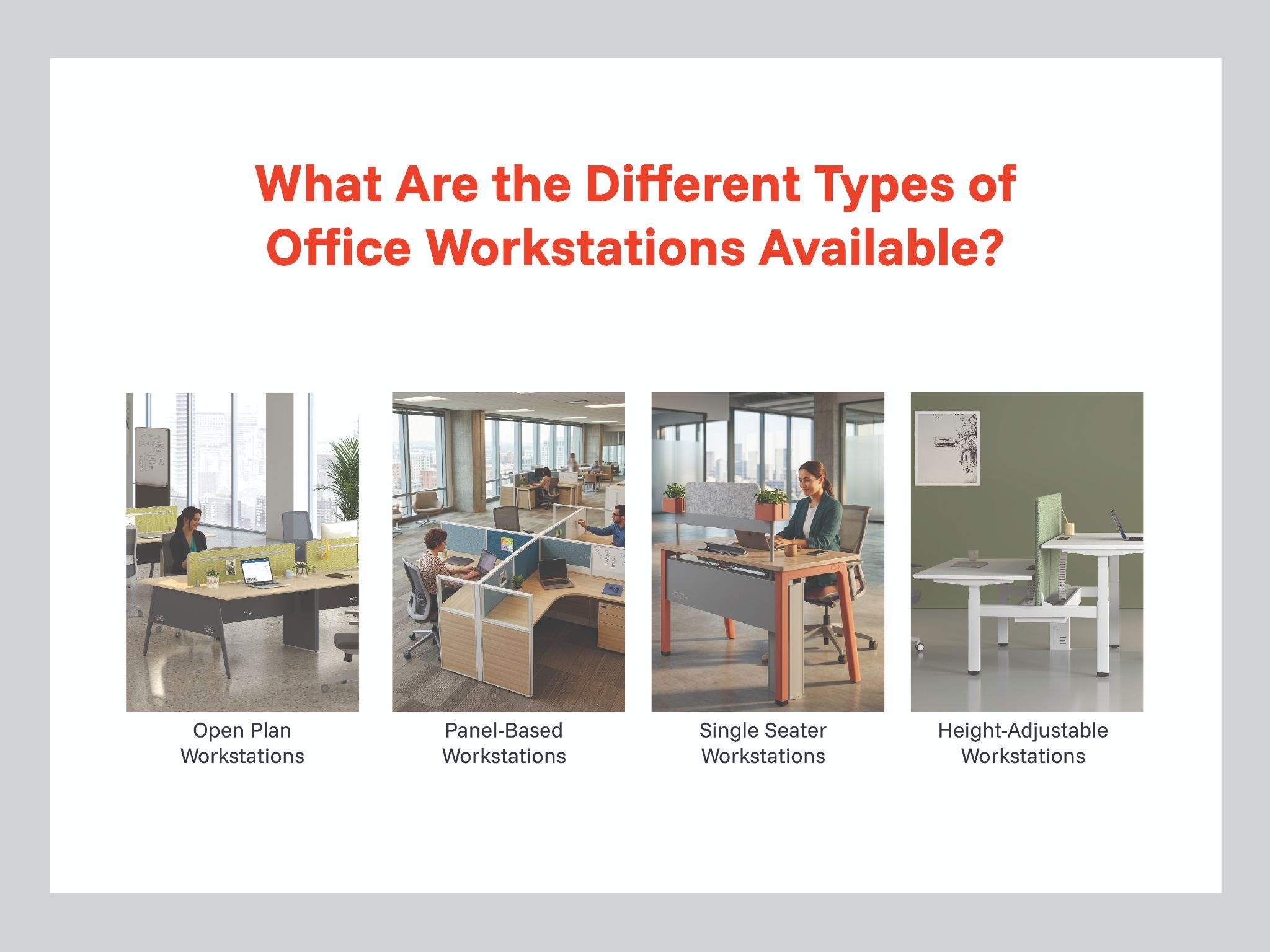
What Are the Different Types of Office Workstations Available?
Open Plan Workstations
An open plan workstation is a shared continuous work surface with minimal or no panel separation between individual positions. It maximises space efficiency and creates a visually connected, energetic environment.
It suits teams that communicate frequently throughout the day and where collaboration and speed of communication are daily operational requirements.
The trade-off is reduced individual privacy, which can be addressed by adding low divider screens between positions without changing the fundamental open character of the layout.
Panel-Based Workstations
A panel-based workstation introduces fabric or glass screens between individual positions, creating defined personal spaces within an open floor. This is the most widely used office workstation configuration in Indian corporate offices.
The panels provide visual separation and partial acoustic management while maintaining a sense of the broader office environment. They suit mixed teams where some tasks require focus and others require communication.
Panel height is the key variable that determines the balance between privacy and openness. Lower panels create a more collaborative feel; higher panels create stronger individual separation.
Single Seater Workstations
A single seater workstation is an individual self-contained desk unit with its own defined boundaries on multiple sides. It provides the highest level of personal space and privacy among standard office workstation types.
It is the right choice for roles requiring sustained concentration, handling of sensitive or confidential information, or a high degree of personal organisation and workspace ownership.
The per-unit cost and floor space requirement are higher than shared configurations, making single seater workstations most appropriate for specific departments rather than entire open-plan floors.
Height-Adjustable Workstations
A height-adjustable workstation adds the ability to transition between sitting and standing positions to any of the above configurations. It addresses the health risks of prolonged static sitting throughout the working day.
These are increasingly specified as standard in Indian corporate offices, particularly for technology companies, financial services firms, and organisations with active employee wellness programs.
The health and productivity benefits of sit-stand working are well documented, and the cost difference from a fixed desk has reduced significantly as demand and supply have grown in the Indian market.
How to Understand Your Team's Working Style Before Choosing Workstations?
Which Roles Need More Privacy?
Finance teams, HR professionals, legal staff, and senior individual contributors all handle sensitive information and require sustained concentration for significant portions of their working day.
These roles benefit from panel-based or single seater workstation configurations that provide visual separation and reduce the ambient noise and interruption that an open layout generates.
Privacy is not just a comfort preference for these roles. It is a functional requirement for the accurate and confidential nature of the work being performed.
Which Roles Need More Collaboration?
Sales teams, customer service operations, creative agencies, and agile development teams rely on frequent spontaneous communication as a core part of how they work and make decisions.
For these teams, open plan workstations with low or no panel separation create the connected, energetic environment that supports their working style most effectively.
Isolating these teams in high-panel configurations slows down communication, reduces team energy, and creates a working environment that feels at odds with the culture these roles require.
What About Mixed Teams?
Most real offices contain a combination of working styles across different functions and roles. A single office workstation type rarely serves the entire floor equally well.
The most effective approach is to zone the floor by working style. Use open plan workstations for highly collaborative functions and panel-based or single seater configurations for roles requiring higher focus and privacy.
This zoned approach allows the office to serve every team's genuine working needs without forcing a single compromise configuration on everyone.
Tip: Before finalising any office workstation specification, spend one working day observing how your team actually communicates. Note which teams interact spontaneously throughout the day and which work in long uninterrupted stretches. This observation will tell you more about the right layout than any survey or assumption.
How Do Privacy Panels Help Without Isolating Employees?
What Panel Height Works Best for Different Teams?
Low panels at approximately 900mm sit below seated eye level. They provide a visual boundary between positions without blocking communication or natural light across the floor. They suit collaborative, fast-moving teams.
Mid-height panels at 1200 to 1400mm provide seated privacy while still allowing standing communication without requiring the employee to move away from their desk. This is the most versatile specification for mixed-function offices.
High panels at 1600mm and above create genuine individual enclosures that provide both visual and acoustic separation. They are appropriate for roles handling sensitive information or requiring deep uninterrupted focus work.
How Do Acoustic Panels Improve the Work Environment?
Acoustic panels are fabric-faced screens that absorb ambient sound rather than reflecting it. In a busy office floor, they meaningfully reduce the cumulative background noise level that fragments concentration.
The improvement is most noticeable in offices of twenty or more people, where multiple simultaneous conversations, phone calls, and keyboard sounds combine into a constant distracting background.
Specifying acoustic fabric panels in areas where noise is a known productivity issue is one of the most cost-effective environmental improvements available for any office workstation floor.
How to Plan a Workstation Layout That Serves Both Needs?
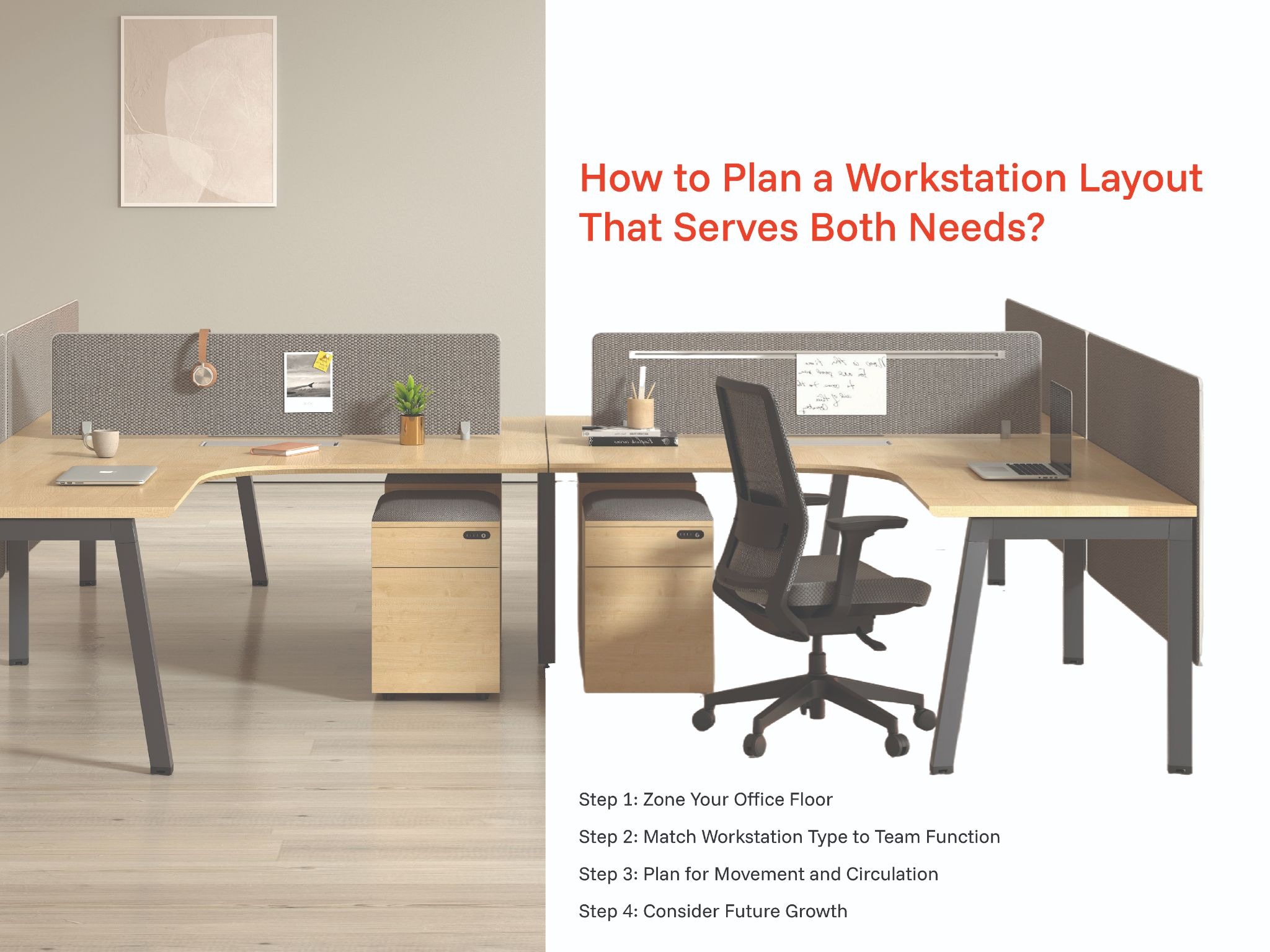
Step 1: Zone Your Office Floor
Start with a clear floor plan and identify which teams will occupy which areas. Group teams with similar working styles together so that the workstation configuration in each zone matches the actual working needs of the people in it.
Mark the position of every electrical socket, data point, and natural light source before specifying any furniture. These fixed elements directly influence the most effective workstation placement.
Step 2: Match Workstation Type to Team Function
Once the floor is zoned, assign the appropriate office workstation type to each zone based on the working style analysis conducted earlier.
Collaborative zones receive open plan or low-panel configurations. Focus zones receive mid-height or high-panel systems. Senior individual roles receive single seater workstations where appropriate.
This matching process ensures every team is working in a configuration that supports rather than obstructs the way they actually do their jobs.
Step 3: Plan for Movement and Circulation
Allow a minimum of three to four feet of clear walkway between rows of office workstations. This provides comfortable passage for two people moving in opposite directions and maintains safe emergency egress routes.
Avoid the temptation to add extra workstations by reducing circulation space. A cramped floor creates daily friction that affects morale and the impression the office makes on visitors.
Step 4: Consider Future Growth
Specify modular office workstation systems that can be extended with matching components as the team grows. This protects the initial investment and eliminates the disruption of a complete reconfiguration every time headcount increases.
Confirm with your supplier that the specific configuration and finish you are selecting will remain available for future orders over the next three to five years.
Bonus Point: For offices undergoing a significant layout change, consider running the new configuration in one department for four to six weeks before rolling it out across the full floor. Real daily use reveals practical issues that no floor plan review can anticipate, and early feedback allows adjustments before the full investment is committed.
What Features Should You Look for in Office Workstations?
Cable Management
Integrated cable management is non-negotiable in any quality office workstation. Every position needs a clean, organised path for power and data cables from the building's floor boxes to the desktop surface.
Visible cabling across a professional floor immediately reduces the perceived quality of the environment and creates genuine tripping hazards that are expensive and disruptive to address after installation.
Ask specifically about the cable routing path, grommet positions, and how the system handles the transition from under-desk cable trays to the desk surface at each individual position.
Surface Area and Storage
The worksurface area must be sufficient for the actual tasks performed at each position. A standard office workstation should accommodate a monitor, keyboard, notebook, and personal items without crowding.
For roles using dual monitors or extensive physical materials, a deeper or wider surface should be specified. A surface that is consistently too small creates clutter and poor organisation habits that persist throughout the employee's time at that desk.
Under-desk pedestals for personal storage keep the worksurface clear and give employees a defined personal space for daily essentials within arm's reach.
Material Quality and Durability
For worksurfaces, high-pressure laminate (HPL) over BWR grade engineered wood with PVC edge banding is the correct specification for Indian commercial environments. It resists scratching, moisture, and daily wear effectively.
For frames, powder-coated steel provides the structural rigidity needed for sustained commercial daily use without flex, deformation, or surface degradation over time.
Verify the specific board grade and steel specification with any supplier before committing to a bulk order. These details determine the service life of the office workstation and the total cost of ownership over a ten-year period.
How AFC Furniture Solutions Designs Office Workstations for Indian Offices?
What Workstation Series Does AFC Offer?
AFC Furniture Solutions offers office workstations across three distinct series, each designed for a specific working environment and configuration requirement.
The Height Adjustable Series is designed for organisations prioritising employee health and active working, allowing each user to transition between sitting and standing with a single button press.
The Desking Series covers clean, open-plan linear configurations suited to collaborative team environments. The Panel Series introduces integrated privacy screen systems for offices that need to balance openness with individual focus and acoustic management.
What Makes AFC Workstations Suitable for Indian Corporate Environments?
AFC Furniture Solutions designs every office workstation specifically for Indian working conditions, including the climate, the physical proportions of Indian users, and the intensity of use in high-occupancy commercial offices.
All products hold BIFMA Level 3 certification, the highest internationally recognised standard for furniture quality and sustainability. This provides independent assurance of structural integrity, material safety, and long-term durability.
Explore the full AFC Furniture Solutions Workstation table to compare the Height Adjustable, Desking, and Panel Series options.
You can also explore the Panel workstation specifically for panel-based workstation configurations that balance privacy and collaboration effectively.
Tip: When visiting an AFC Furniture Solutions experience centre, bring your floor plan and team structure details. The workspace consultants can produce a scaled 2D or 3D layout showing exactly how different office workstation configurations will look and function in your specific space before any order is placed.
Frequently Asked Questions
Q1. What is the best office workstation type for a mixed team?
A panel-based workstation with mid-height screens is the most versatile choice for mixed teams. It provides enough visual separation for individual focus while keeping the environment open enough for natural daily communication.
Q2. How do I reduce noise in an open plan workstation area?
Specify acoustic fabric panels between positions and consider acoustic ceiling tiles or soft furnishings in adjacent breakout areas. These additions meaningfully reduce ambient noise without requiring structural changes to the office.
Q3. How much surface area does each person need at an office workstation?
A minimum of 1200mm x 600mm per person is the standard recommendation for a single position. Roles using dual monitors or extensive physical materials should be allocated a deeper or wider surface of at least 1500mm x 750mm.
Q4. Can modular office workstations be extended as the team grows?
Yes. Modular office workstation systems are specifically designed for incremental extension. Matching components can be added to the existing configuration without replacing the entire setup, which protects the initial investment as the team grows.
Q5. What is the difference between a desking series and a panel series workstation?
A desking series workstation is an open continuous work surface suited to collaborative environments. A panel series workstation introduces integrated privacy screens between positions, providing greater individual separation while maintaining the shared infrastructure of a linear system.
Q6. How long should quality office workstations last?
Commercial-grade office workstations from a reputable manufacturer should deliver seven to twelve years of reliable daily use under normal corporate conditions. The key variable is whether the products were specified and built to commercial rather than residential standards from the outset.
Final Thoughts
Choosing office workstations that balance privacy and collaboration is one of the most consequential workspace decisions any organisation makes. It directly shapes how your team performs, communicates, and experiences the working day for years to come.
The right answer is rarely a single workstation type applied uniformly across the entire floor. It is a considered combination of configurations matched to the actual working needs of different teams and roles.
AFC Furniture Solutions has been helping Indian organisations design and specify office workstations that serve the full range of working styles for over 15 years. Our workspace consultants are available to guide you from initial floor plan through to completed installation.
Explore Other Popular Blogs


Let’s build together
Tell us about your project and we’ll help you plan, design, and deliver at scale.
.jpg)
.svg)