.svg)
Top Features to Look for Before Buying an Ergonomic Office Chair

A detailed, expert guide to choosing the right ergonomic office chair in India covering lumbar support, seat depth, materials, armrests, and correct setup
Most professionals in India invest considerable thought into their laptops, monitors, and internet connections. Very few apply the same level of consideration to the one thing they interact with more than any other tool in their workspace: their office chair.
If you are spending eight or more hours a day seated at a desk, the chair supporting you through those hours has a more direct and continuous impact on your physical health, your energy levels, and your ability to concentrate than almost any other equipment decision you will make. A chair that looks adequate but lacks genuine ergonomic design can and frequently does contribute to chronic lower back pain, neck strain, poor circulation, and the kind of persistent physical fatigue that is quietly mistaken for stress or overwork.
This guide, drawn from over 15 years of workspace design experience at AFC Business Solutions, covers everything you need to understand before choosing an ergonomic office chair for daily professional use.
What Is an Ergonomic Office Chair and Why Does It Matter?
The word 'ergonomics' comes from the Greek 'ergon' (work) and 'nomos' (natural laws) in practical terms, it refers to the science of designing tools and environments to fit the people using them, rather than expecting people to adapt themselves to poorly designed equipment.
An ergonomic office chair is not simply a comfortable chair. It is a precisely engineered product designed to maintain the spine's natural S-shaped curve, distribute seated body weight across appropriate contact points, reduce static muscle load, and allow for the small, continuous postural adjustments that keep the musculoskeletal system healthy during extended periods of desk work.
The critical difference from a standard chair is adjustability. A well-designed ergonomic chair can be configured to match the body dimensions and working posture of a wide range of individuals. Without this adjustability, even a chair built with good ergonomic intent will fail to deliver its benefits to a significant proportion of the people who use it.
Why Indian Workers in Particular Need Better Office Seating
Back pain and neck pain are among the most commonly reported occupational health complaints among desk workers in India. Several factors compound this: long daily commutes that put the spine under stress before the working day even begins, office cultures that normalise very long working hours, and a historical tendency to under-invest in seating quality relative to other office equipment.
The consequences extend beyond personal discomfort. Chronic physical pain is a significant cognitive distraction; it competes directly with concentration, reduces decision-making quality, and contributes to fatigue that accumulates across the week. Organisations that recognise this and invest in appropriate ergonomic seating; consistently report improvements in sustained focus and reductions in sick leave.
Poor circulation caused specifically by chair designs with sharp front edges that press into the underside of the thigh is another frequently overlooked issue. This manifests as leg heaviness, numbness, and the characteristic "dead leg" sensation that many desk workers experience in the afternoon. Ergonomically designed chairs address this with a rounded, "waterfall" front edge that allows unobstructed blood flow through the seated position.
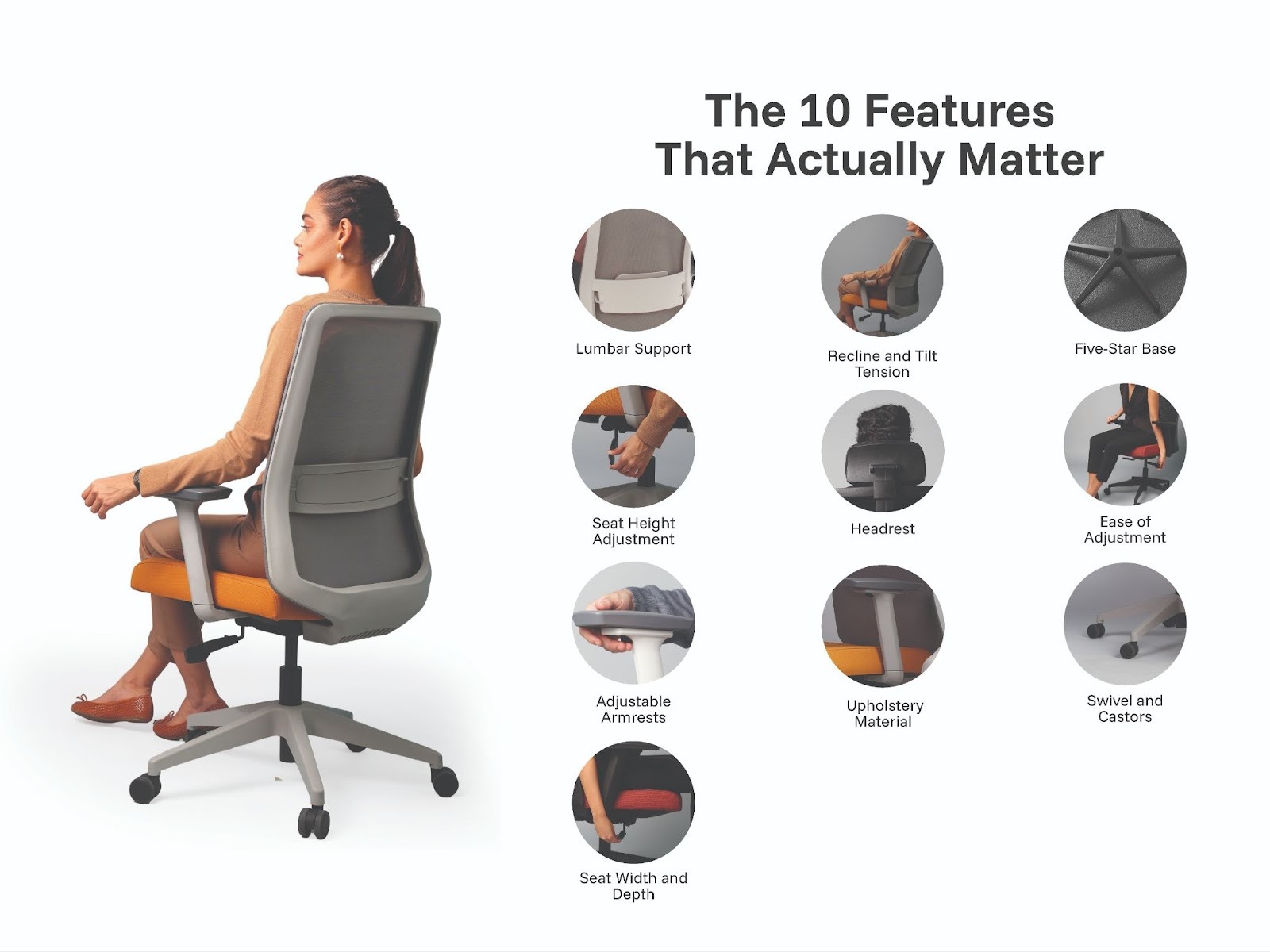
The 10 Features That Actually Matter
When evaluating any ergonomic chair, the following ten specifications determine whether it will genuinely support your health over years of daily use or simply look the part.
1. Lumbar Support
The lumbar spine has a natural inward curve at the lower back. Chairs without adequate support in this region allow the lower back to flatten and round outward over time, placing progressive stress on the intervertebral discs and the surrounding musculature. The result, experienced by millions of desk workers, is chronic lower back pain that worsens incrementally and becomes difficult to reverse once established.
Effective lumbar support holds the lower spine in its natural position throughout the working day. The best implementations allow the support to be adjusted both vertically to align with each user's specific lumbar anatomy and in depth, so the firmness of support can be personalised. If you sit for more than four hours daily, independently adjustable lumbar support is not an optional feature.
2. Seat Height Adjustment
Correct seated posture requires the feet to rest flat on the floor, the thighs to be roughly horizontal, and the knees to form approximately a 90-degree angle. Because people vary significantly in leg length and overall height, a chair that cannot be adjusted to accommodate this range will inevitably place some users in positions that create lower back, hip, or knee strain.
Evaluate the gas lift mechanism carefully. It should operate smoothly and silently, hold its position reliably under body weight, and offer a height range sufficient to serve users from approximately 155cm to 190cm in height.
3. Adjustable Armrests
Armrests that are set at the wrong height are frequently worse than no armrests at all. Too high, and they force the shoulders upward, creating tension across the upper trapezius that accumulates into neck and shoulder pain. Too low, and users tend to lean sideways or forward, disrupting their spinal alignment.
The goal is for the armrests to support the forearms with the shoulders in a fully relaxed, neutral position. For users who type extensively, 3D adjustable armrests, which adjust in height, forward/backward position, and lateral angle allow genuinely precise positioning that reduces wrist, elbow, and shoulder strain measurably compared to fixed or single-axis armrests.
4. Seat Width and Depth
The seat should be wide enough to accommodate the user comfortably without compressing the outer thighs. More importantly, the seat depth the front-to-back dimension, should allow the user to sit fully back against the lumbar support while leaving approximately two to three finger-widths of clearance between the back of the knee and the front edge of the seat. This clearance is essential to prevent the seat edge from pressing against the popliteal artery and restricting circulation.
Users who are taller than average often find standard seat depths insufficient; those who are shorter may find them excessive. If seat depth is not adjustable, verify the dimensions carefully against your own measurements before committing.
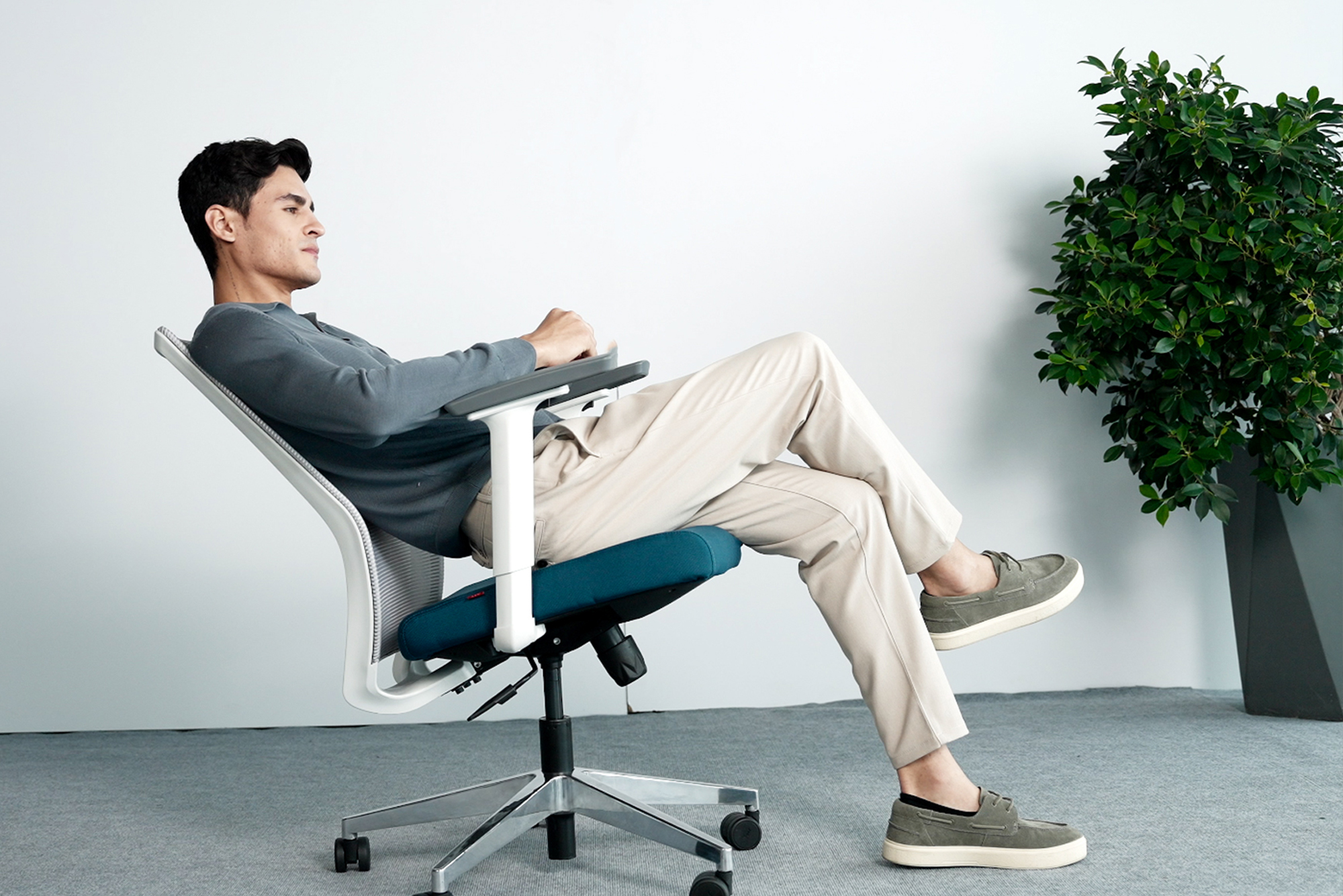
5. Recline and Tilt Tension
Maintaining a single fixed posture for hours at a time is fatiguing regardless of how well the chair is configured. The body benefits from periodic postural variation, and a well-designed recline mechanism facilitates this naturally during phone calls, reading tasks, or moments of reflection.
The tilt tension control, typically a knob or lever beneath the seat, sets the resistance of the recline. It should be adjustable to match the user's body weight: light users need minimal resistance to initiate movement; heavier users need sufficient resistance to feel secure when leaning back. A chair that cannot be tuned in this way will either feel unstable or require uncomfortable effort to move.
6. Headrest
A headrest is not universally necessary, but it delivers significant value for users whose work involves extended reading, video calls, or presentation viewing tasks where the head spends time in a supported, slightly reclined position. Without support in these moments, the neck muscles must sustain the full weight of the head (approximately 4 to 5 kilograms) in an unsupported posture, which is a common source of tension headaches and upper neck pain.
For users who spend most of their time actively typing and leaning forward toward a monitor, a headrest may see little use. Assess your actual working posture honestly before treating it as a mandatory feature.
7. Upholstery Material
In the context of India's climate, particularly in cities without year-round air conditioning upholstery material has a direct and practical impact on comfort throughout the working day.
Mesh upholstery is the most practical choice for the majority of Indian office environments. Its open-weave structure allows continuous air circulation across the back and seat, preventing the heat buildup and perspiration that make other materials uncomfortable in warm conditions. AFC Business Solutions' Mesh Chair range offers ergonomic mesh seating designed specifically for the demands of the Indian workplace with adjustable lumbar support, breathable back panels, and commercial-grade construction suited to heavy daily use.
Leather upholstery projects a premium, executive aesthetic and offers exceptional durability and ease of cleaning. It is the natural choice for boardrooms, executive office chairs, and client-facing spaces where appearance is a priority provided the environment has reliable air conditioning.
Fabric upholstery is softer and more tactile and comes in the widest range of colours. It requires more care to keep clean and is less suited to high-traffic environments but offers a warm, comfortable feel well suited to individual home office setups.
8. Swivel and Castors
A full 360-degree swivel allows the user to turn to reach items across the desk, address colleagues, or access equipment without the twisting spinal movements that accumulate into lower back problems over time. This is a standard feature on any quality office chair, but the quality of the swivel mechanism varies; it should operate smoothly and without resistance.
Castor quality matters more than it is often given credit for. Hard-floor castors and carpeted-floor castors are different products; using the wrong type either damages flooring or creates excessive rolling resistance. Verify compatibility with your floor surface, and check that the castors roll quietly. Persistent scraping sounds across a hard floor are a meaningful workplace irritant.
9. Five-Star Base
The base of the chair directly determines its stability. A five-point base distributes the user's weight across the widest possible footprint, making it significantly more resistant to tipping under lateral load when leaning to the side or reaching across the desk, for example. A four-point base, found on cheaper products, is inherently less stable and should be avoided for daily professional use.
The base material should be evaluated alongside its geometry. Nylon bases are lighter and adequate for most office environments. Polished aluminium bases offer superior durability and a more refined aesthetic for executive office settings.
10. Ease of Adjustment
A technically sophisticated chair that users cannot adjust intuitively will not deliver its ergonomic benefits in practice. Controls that require reading a manual, or that are positioned in ways that make them inaccessible while seated, result in chairs that are set up once on arrival and never revisited, often incorrectly.
The best ergonomic chairs place all primary adjustments within easy reach of a seated user and communicate their function clearly through labelling or intuitive lever design. When evaluating a chair, sit in it and test every adjustment mechanism before forming a view on the product.
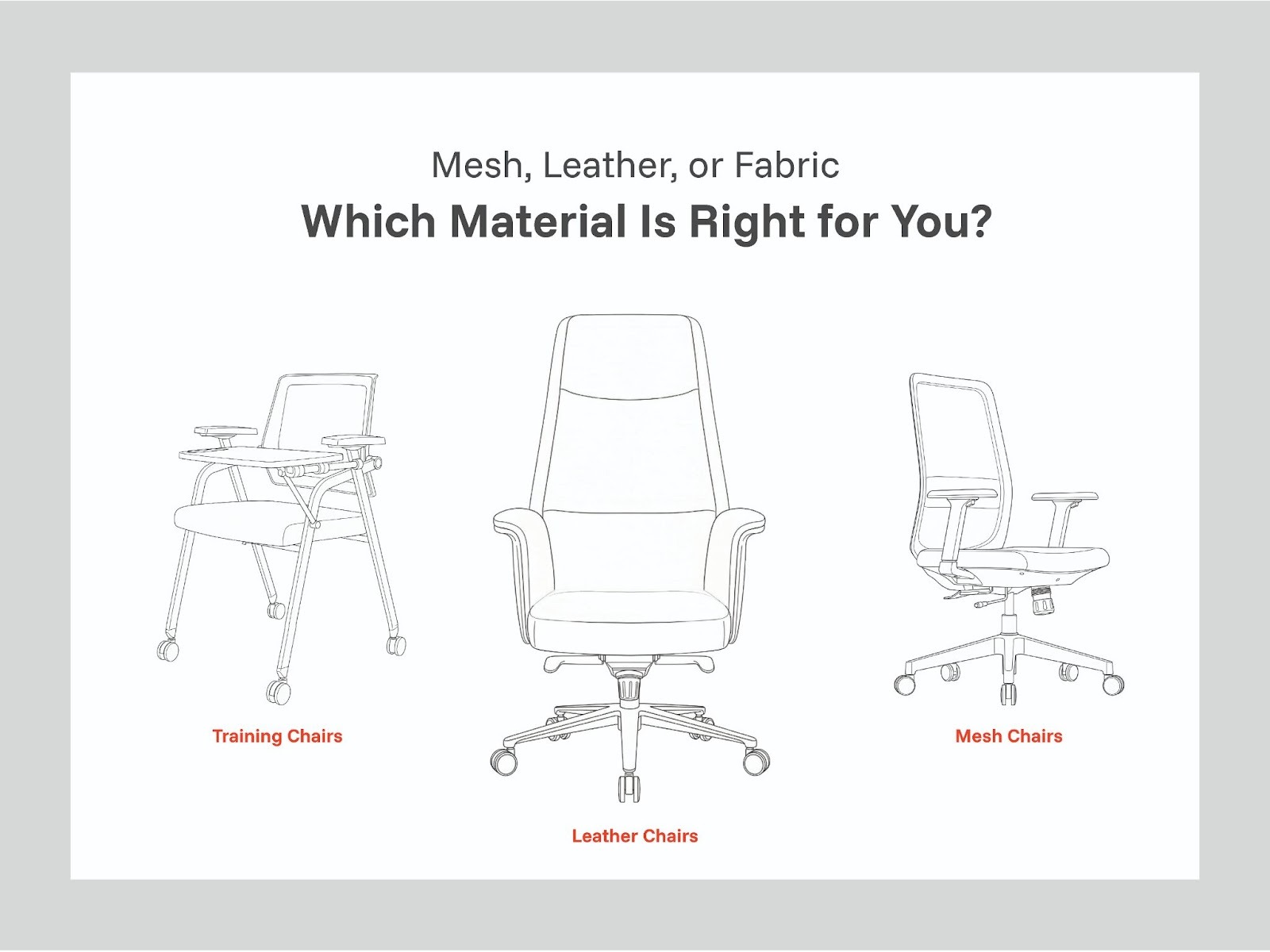
Mesh, Leather, or Fabric: Which Material Is Right for You?
The right upholstery depends on three variables: your working environment, your typical working hours, and the visual context of the space.
Mesh is the practical frontrunner for most Indian office environments. Its breathability makes it comfortable across long working days in warm conditions, and it maintains its structural support without the compression and sagging that foam-heavy alternatives develop over time. It is the default recommendation for open-plan offices, home offices, and any environment without consistent temperature control.
Leather is the appropriate choice for executive and client-facing settings where the chair is as much a statement of the organisation's standards as it is a piece of functional equipment. Its durability and ease of cleaning are genuine advantages in high-use environments —but it requires a well-air-conditioned room to remain comfortable across a full working day.
Fabric suits environments where comfort and aesthetics are the primary considerations and cleaning demands are lower. It is well suited to private offices and home setups but less practical in shared or high-traffic environments.
You can explore AFC Business Solutions' full seating range covering mesh chairs, leather chairs, and training chair options to compare specifications across different use cases and environments.
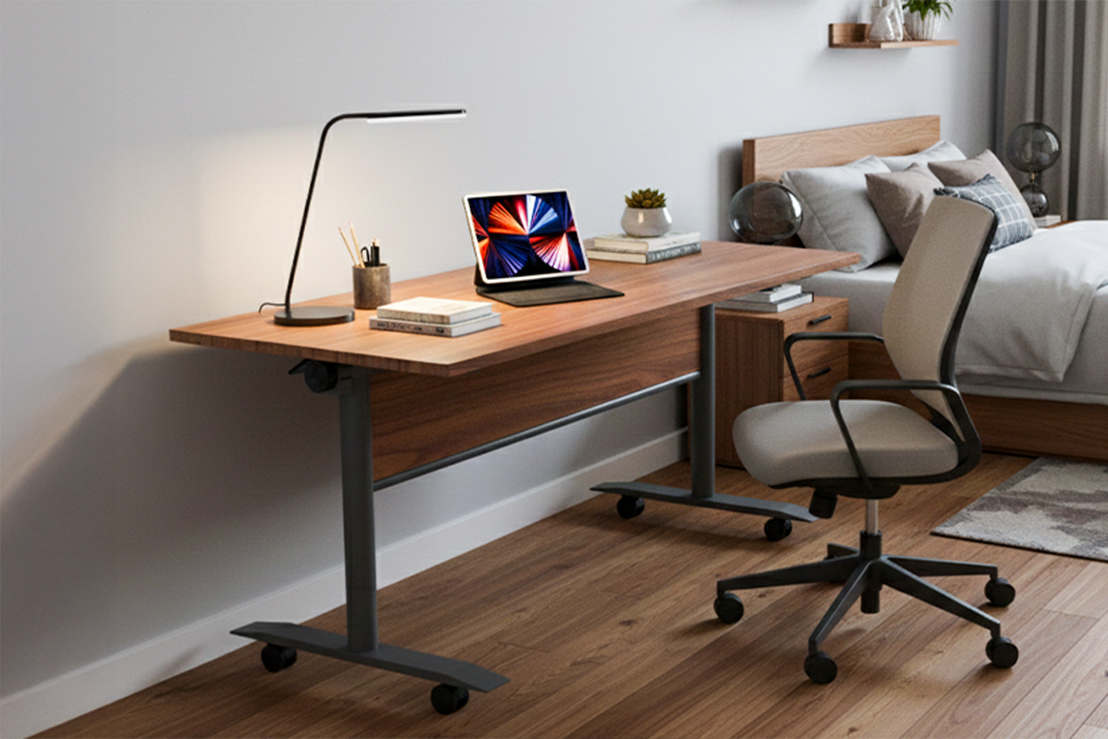
How to Set Up Your Ergonomic Chair Correctly
Even the best-specified ergonomic office chair will underdeliver if it is not configured correctly for the individual using it. The following sequence takes approximately five minutes and makes a significant difference to the daily experience of the chair.
Start with seat height. Adjust until both feet rest flat on the floor, the thighs are approximately horizontal, and the knees form roughly a 90-degree angle. If the desk height prevents this with your feet flat, a footrest is the correct solution not raising the chair and allowing the feet to hang.
Adjust the lumbar support. Move the lumbar support vertically until you feel it making gentle contact with the inward curve of your lower spine. It should feel like a supportive presence, not a pressure point. If depth is adjustable, set it so the support follows the contour of your back without pushing you forward out of a natural seated position.
Configure the armrests. Set the height so that with your shoulders fully relaxed and your upper arms hanging naturally, your forearms rest on the armrests at the same height as your keyboard. Your wrists should remain level while typing, not angled upward or downward.
Check your monitor position. Once the chair is configured, the top of your monitor screen should be at approximately eye level. If it is significantly lower, you will maintain a forward head posture regardless of how well the chair is set up, and neck strain will result. Adjust monitor height or use a monitor arm to correct this before concluding the setup.
Set the tilt tension. Lean back slowly and assess whether the resistance matches your body weight. Adjust the tension knob until the recline feels controlled and secure neither requiring excessive effort to initiate nor feeling unstable at the point of lean.
Build a movement habit. No chair, however well specified, eliminates the physiological need for movement. Standing briefly every 45 to 60 minutes restores circulation, releases accumulated muscle tension, and maintains the metabolic activity that prolonged static sitting suppresses.
Common Mistakes to Avoid When Choosing an Office Chair
Prioritising aesthetics over function. Gaming chairs are a common example they are designed to look dramatic and are often marketed aggressively, but their ergonomic credentials rarely match their visual impact. A chair intended for ten hours of professional work should be evaluated on its adjustability, lumbar support, and material quality, not its visual design language.
Ignoring the weight rating. Every chair has a specified maximum user weight. Exceeding this rating accelerates mechanical wear, increases the risk of structural failure, and typically voids the warranty. Always verify the weight specification before finalising a purchase.
Treating price as the primary criterion. The cost of a poor-quality chair is not the purchase price it is the cumulative cost of physical discomfort, reduced productivity, potential medical expenses, and premature replacement. A chair used eight hours a day, five days a week, represents a daily cost that makes quality a straightforwardly rational investment when the full picture is considered.
Not testing before purchasing. Physical dimensions, cushion firmness, and adjustment ease are all characteristics that vary considerably between products that read similarly on a specification sheet. Visiting a showroom to sit in a shortlisted ergonomic chair for at least fifteen minutes provides information that no product listing can replicate.
Frequently Asked Questions
Q1. Is an ergonomic chair worth the additional investment compared to a standard office chair?
For anyone spending more than four hours a day seated at a desk, yes unambiguously. The health protection, sustained comfort, and productivity benefits of proper ergonomic support accumulate daily and compound over years. The comparison is not the price of the chair against a cheaper alternative; it is the price of the chair against the long-term cost of the physical problems that inadequate office seating creates.
Q2. Can students benefit from ergonomic chairs during extended study sessions? Yes. The postural demands of sustained study are effectively identical to those of desk-based professional work. The key consideration for younger users is ensuring the seat height can be set low enough for their feet to reach the floor. Where this is not possible, a footrest is an inexpensive and effective complement.
Q3. How long should a well-made ergonomic chair last?
A commercial-grade ergonomic chair, properly maintained and not subjected to loads beyond its specified rating, should deliver reliable service for seven to twelve years. Regular cleaning, prompt attention to any developing mechanical issues, and protection from direct heat sources all contribute to longevity.
Q4. For an Indian home office, which chair type is most practical?
Mesh is the most practical choice for most home office users in India. It performs well in warm conditions, tends to be lighter and more compact than executive leather alternatives, and offers sufficient ergonomic support for full working days at a price point accessible across a range of budgets.
Q5. Why do my legs feel numb or heavy after sitting for a few hours?
This is almost always caused by pressure on the popliteal artery, the blood vessel running behind the knee from a seat edge that is either too high, too deep, or too sharply angled. An ergonomic chair with a waterfall front edge and correctly calibrated seat depth eliminates this issue by ensuring unobstructed circulation through the seated position.
Final Thoughts
The ergonomic office chair you sit in for eight or more hours every working day is one of the most consequential equipment decisions you will make for your health and your professional effectiveness. It deserves the same careful evaluation that most people apply to far less frequently used items.
The features that matter most adjustable lumbar support, correct seat depth, quality armrests, appropriate upholstery for your climate, and a stable five-star base are all verifiable before purchase. Understanding what to look for removes the guesswork and makes it straightforward to identify the products that will genuinely serve you well over years of daily use.
AFC Business Solutions has been designing and supplying ergonomic office seating for Indian professionals and organisations for over 15 years. Our team is available to help you identify the right solution for your specific working environment, body type, and budget.
Contact Us
📧 Email: customercare@afcindia.in
📞 Phone: +91 9999006933
🌐 Website: www.afcindia.in
Head Office: Plot No. 33, Ecotech 12, Greater Noida West, UP – 201310
Experience Centres: Noida · Gurugram · Mumbai · Bengaluru · Hyderabad· Pune
Explore Other Popular Blogs

Let’s build together
Tell us about your project and we’ll help you plan, design, and deliver at scale.
.jpg)
.svg)