.svg)
Best Chair for Back Pain Relief: What to Look for Before You Buy

Struggling with back pain at your office desk? This guide covers what to look for in a chair for back pain relief and expert recommendations from AFC Furniture Solutions.
Why Is Back Pain So Common Among Indian Office Professionals?
Back pain has become one of the most consistent and most accepted forms of daily discomfort among Indian desk professionals. In countless offices across Delhi NCR, Bengaluru, Mumbai, Hyderabad, and Pune, the end-of-day back ache is treated as an inevitable consequence of a long working day rather than a preventable outcome of an inadequate chair.
This acceptance is the problem. Back pain from extended desk work is not inevitable. It is the predictable result of sitting in a chair that does not support the spine correctly for the duration and intensity of the professional working day. Change the chair and the outcome changes with it.
What Is Causing the Back Pain Epidemic in Indian Workplaces?
A systematic review published by the National Center for Biotechnology Information confirmed that back injuries account for 28.8% of lost time claims in workplace settings, with workers suffering from lower back pain losing an average of 6.2 hours of productive work per month. The review further confirmed that chair interventions offer meaningful support for reducing musculoskeletal pain in workers who sit for prolonged periods.
India's office workforce faces this problem at scale. The rapid growth of technology, financial services, consulting, and media sectors has created tens of millions of desk-based professionals working eight to twelve hours daily in environments where the chair specification has not kept pace with the physical demands being placed on it.
The result is a predictable pattern of lower back pain, cervical stiffness, and shoulder tension that most Indian professionals have normalised as part of professional life rather than recognising as a direct consequence of inadequate seating specification.
How Does a Wrong Chair Contribute to Chronic Back Pain?
A chair without adequate lumbar support allows the natural inward curve of the lower spine to flatten progressively under the weight of the upper body during extended sitting. This flattening increases compressive load on the intervertebral discs, strains the posterior spinal ligaments, and fatigues the erector spinae muscles that compensate by working harder to maintain upright posture.
Across a single working day, this mechanism creates the familiar lower back ache that peaks in the late afternoon. Across weeks, months, and years of daily exposure, it contributes to the progressive disc degeneration, facet joint irritation, and chronic muscular tension that require medical intervention to address.
A chair that correctly supports the lumbar curve removes this mechanism from the equation. The discs remain at appropriate pressure levels. The posterior ligaments are not overstretched. The erector spinae muscles are not chronically fatigued. The afternoon back ache does not develop in the first place.
Can the Right Office Chair Actually Relieve Back Pain?
What Does Research Say About Chairs and Back Pain?
The scientific evidence consistently supports the role of correctly specified seating in reducing occupational back pain. The systematic review published by NCBI found that multiple moderate-quality studies offer support for chair interventions improving musculoskeletal pain and discomfort in workers who sit for prolonged periods.
The key qualifier in the research is that the chair must be correctly specified and correctly adjusted. A chair with adjustable lumbar support that is positioned incorrectly provides no more benefit than a chair without lumbar support. The physical benefit of ergonomic seating is contingent on correct configuration for the individual user's body dimensions and working pattern.
This distinction is important because it means that simply purchasing an ergonomic chair labelled for back pain relief is not sufficient. The chair must have genuine adjustability, the user must configure it correctly, and the specification must match the actual working duration and postural demands of the role.
What Type of Back Pain Can a Chair Help With?
A correctly specified ergonomic chair is most effective at relieving postural back pain caused by sustained incorrect seated posture, muscle fatigue back pain from prolonged static sitting in a poorly supported position, and disc pressure-related discomfort from extended sitting without lumbar curve maintenance.
These categories account for the large majority of back pain reported by Indian desk professionals. They are directly addressable through correct chair specification and adjustment.
A chair cannot address back pain arising from structural spinal conditions, disc herniation requiring surgical intervention, inflammatory conditions such as ankylosing spondylitis, or referred pain from abdominal or pelvic pathology. For any persistent or severe back pain, medical assessment alongside ergonomic improvement is the appropriate approach.
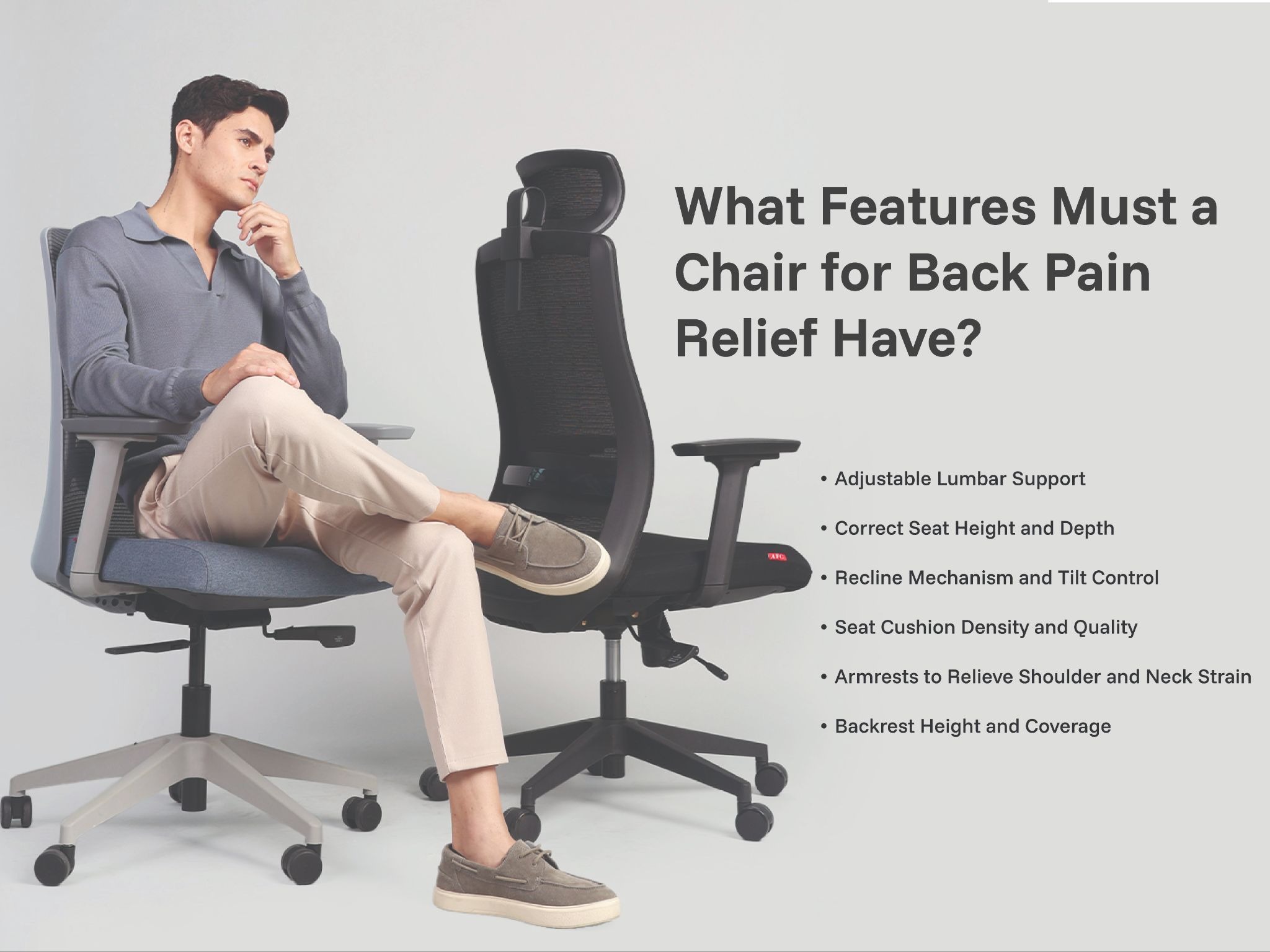
What Features Must a Chair for Back Pain Relief Have?
Adjustable Lumbar Support
Adjustable lumbar support is the single most important feature in any chair purchased specifically for back pain relief. It must be adjustable in height to align precisely with the natural inward curve of the specific user's lower spine, and ideally adjustable in depth to personalise the firmness of contact.
The lumbar support must maintain consistent contact with the lower back across the full duration of the working session. A support that requires constant conscious repositioning is not providing the passive structural assistance that allows the spinal muscles to work at a lower sustained intensity across the working day.
Reject any chair marketed for back pain relief that has a fixed, non-adjustable lumbar insert. Fixed lumbar supports are positioned for an assumed generic spine and provide no benefit for users whose lumbar curve does not match that assumption, which is the majority of real users.
Correct Seat Height and Depth
Incorrect seat height is a frequently overlooked contributor to lower back pain. A seat that is too high forces the feet off the floor, rotating the pelvis backward and flattening the lumbar curve. A seat that is too low creates excessive knee flexion and forward pelvic tilt that places sustained strain on the lumbar region.
The correct seat height places both feet completely flat on the floor with the knees at approximately 90 degrees. Seat depth adjustment ensures a two to three finger gap between the front seat edge and the back of the knees, preventing the circulation restriction in the thighs that contributes to the leg fatigue that compounds lower back discomfort during long sessions.
Recline Mechanism and Tilt Control
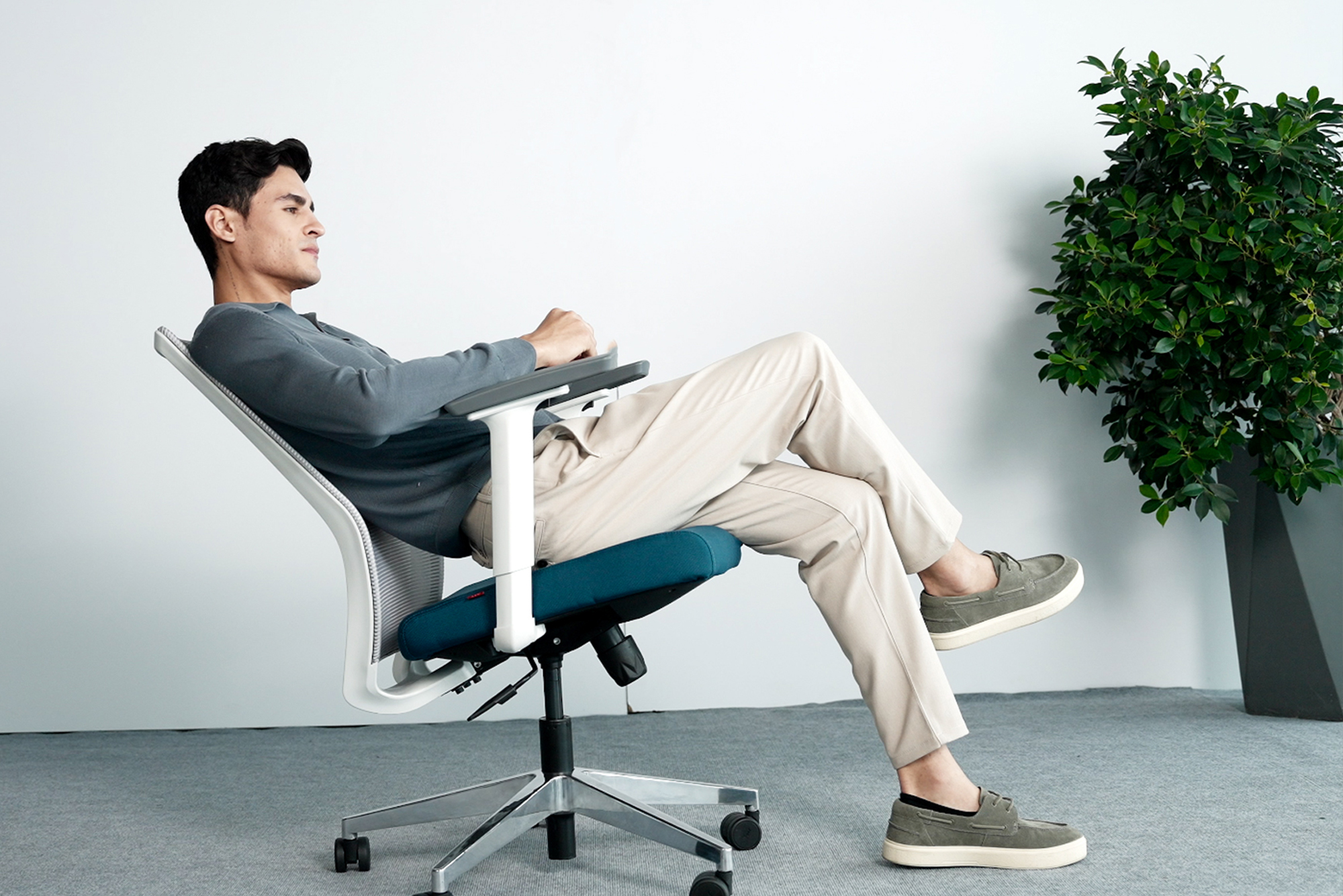
A quality weight-balanced tilt mechanism is one of the most effective tools for active back pain management in an office chair. A slight recline of approximately 100 to 110 degrees reduces the compressive load on the intervertebral discs by shifting the weight of the upper body into the backrest rather than concentrating it on the lumbar spine.
Professionals with lower back pain often find that a controlled recline during reading, listening, or thinking activities provides immediate relief from the sustained lumbar compression that upright sitting maintains. A tilt mechanism with adjustable tension and a reliable tilt lock allows this relief position to be held comfortably without muscular effort.
Seat Cushion Density and Quality
The seat cushion must maintain consistent support density across the full working session without compressing to a hard, unsupported surface that increases pelvic pressure and disrupts the postural alignment that the lumbar support is working to maintain.
High-density foam that resists significant hand compression maintains its support properties across years of commercial daily use. Low-density foam that compresses easily under hand pressure will feel like sitting on a hard surface within ninety minutes of a session, creating the pelvic pressure that directly worsens lower back pain regardless of the quality of the lumbar support above it.
Armrests to Relieve Shoulder and Neck Strain
Back pain in the office rarely exists in isolation. The upper back, neck, and shoulder tension that accompanies lower back pain is often a consequence of the same postural failure that causes the lower back problem. Armrests that correctly position the forearms at keyboard height with the shoulders completely relaxed reduce the upper back muscular load that contributes to the total spinal strain picture.
Armrests set too high force the shoulders into a permanently elevated position that strains the upper trapezius and cervical region. Too low, and the professional leans sideways to find support, creating asymmetric loading of the lumbar spine that directly worsens existing lower back pain.
Backrest Height and Coverage
For professionals experiencing lower back pain, a high-back chair that supports the full length of the spine, including the upper back and cervical region, is significantly more effective than a mid-back chair. The upper back support removes the sustained muscular effort required to maintain head and thoracic position, reducing the total spinal load that the lower back must manage.
Many professionals discover that what presents as lower back pain has a significant upper back and cervical component that they had not connected to their sitting position. A high-back chair that addresses both simultaneously produces better back pain relief outcomes than a chair targeting only the lumbar region in isolation.
Tip: When setting up a chair specifically for lower back pain relief, spend the first two weeks using a timer to check lumbar support contact every thirty minutes. The most common reason ergonomic chairs fail to relieve back pain is that users slide forward in their seat across the session, losing lumbar contact and recreating the flat-back sitting position the chair is designed to prevent. Building the habit of maintaining full back contact with the chair back takes two to three weeks of conscious reinforcement before it becomes automatic.
What Type of Chair Works Best for Back Pain Relief?
High Back Ergonomic Mesh Chairs
For Indian professionals experiencing back pain from extended desk work, a high-back ergonomic mesh chair with adjustable lumbar support, seat depth adjustment, and a weight-balanced tilt mechanism is the most consistently effective specification.
The high backrest addresses both the lumbar and thoracic components of occupational back pain. The mesh upholstery maintains breathability across long sessions in Indian conditions, preventing the thermal discomfort that causes postural shifting and lumbar support disengagement. The full adjustability allows the chair to be configured precisely for each individual user's spinal anatomy.
Executive Leather Chairs with Lumbar Support
For senior professionals in cabins with reliable air conditioning, a high-back executive leather chair with genuine adjustable lumbar support is an appropriate specification for back pain relief that simultaneously meets the visual authority requirements of an executive environment.
The key specification requirement is that the lumbar support must be genuinely adjustable in height. Many executive leather chairs include a fixed lumbar insert rather than a true adjustable mechanism. A fixed insert is not effective for back pain relief for the majority of users and should not be accepted as an adequate specification for this purpose.
Mid Back Chairs for Shorter Sessions
For professionals with lower back pain who work in roles involving sessions of two to three hours or less, a quality mid-back chair with good adjustable lumbar support can provide adequate relief for the session duration without requiring the full specification of a high-back chair.
For sessions of four or more hours daily, a mid-back chair is not an adequate specification for back pain management regardless of the quality of its lumbar support. The absence of upper back and neck support creates a sustained muscular load that compounds the lower back pain the chair is intended to relieve.
What Sitting Habits Make Back Pain Worse Even in a Good Chair?
Sitting Without Lumbar Contact
The most common and most damaging sitting habit in any ergonomic chair is sliding forward in the seat until the lower back loses contact with the lumbar support. This position recreates the unsupported flat-back sitting that causes occupational back pain in the first place, regardless of the quality of the chair behind the user's back.
Every ergonomic benefit of the chair depends on the user maintaining full back contact with the backrest. A chair correctly adjusted but not used correctly provides no more physical benefit than a standard chair. Chair setup and correct use are inseparable components of effective occupational back pain management.
Crossing Legs or Sitting Asymmetrically
Crossing legs during extended sitting creates asymmetric pelvic loading that places unequal compressive stress on the two sides of the lumbar spine. This asymmetry is one of the most consistent contributors to the one-sided lower back pain that many desk professionals experience predominantly on one side.
Similarly, leaning to one side to use a mouse, reach for papers, or speak to a colleague while sustaining this position for minutes or hours creates the same asymmetric lumbar loading. Awareness of lateral symmetry in seated posture is a practical and immediate back pain management tool that costs nothing and requires no equipment change.
Staying Seated Without Movement Breaks
No chair, regardless of its specification, eliminates the physical costs of sustained static sitting entirely. Intervertebral disc nutrition depends on the pressure cycling that occurs during movement. Extended static sitting reduces disc nutrition, accelerates fatigue in the supporting musculature, and progressively increases lumbar discomfort regardless of the postural support provided by the chair.
The 20-8-2 movement rule provides a practical structure for managing this. For every thirty minutes of working time, sit for twenty minutes, stand for eight, and move briefly for two. This pattern reduces static lumbar loading, maintains disc health, and significantly extends the comfortable working duration in any chair specification.
Monitor Position Too Low or Too High
A monitor positioned below eye level creates a persistent forward head posture that places progressively higher effective load on the cervical spine and upper thoracic region. This upper body strain compounds the lower back pain that is the primary concern, creating a total spinal strain picture that the chair alone cannot address.
The top of the monitor should be at approximately eye level, with the screen at arm's length distance. This alignment allows the head to remain in its neutral position, reducing the upper body contribution to the spinal strain that manifests as combined back, neck, and shoulder discomfort in many Indian desk professionals.
How to Set Up Your Chair Correctly for Back Pain Relief?
Step 1: Set Seat Height
Adjust the gas lift until both feet rest completely flat on the floor with the knees at approximately 90 degrees and the thighs roughly horizontal. If this height is not achievable at your desk height, use a footrest rather than raising the chair and losing correct knee alignment.
This step is the foundation of all subsequent adjustment. Every other ergonomic benefit depends on the pelvis being in a neutral position, which only correct seat height can achieve.
Step 2: Position Lumbar Support
Adjust the lumbar support height until it makes firm, consistent, comfortable contact with the natural inward curve of your lower back when you sit all the way back in the chair. The support should feel like a continuous gentle presence, not a point of pressure pushing you forward.
If depth adjustment is available, increase the depth gradually until the support follows the contour of your lower back without pushing the pelvis forward. Recheck this position after fifteen minutes of sitting as the body settles and the optimal position may shift slightly.
Step 3: Adjust Armrests
Lower or raise the armrests until the elbows rest at approximately 90 degrees with the shoulders completely dropped and relaxed. The forearms should rest lightly on the armrests without bearing significant weight.
Any shoulder elevation to reach the armrests means they are set too high. Any lateral leaning to reach them means they are set too far apart. Both conditions create upper body strain that worsens the total spinal pain picture.
Step 4: Set Recline Tension
Set the tilt tension so the chair reclines smoothly against a resistance that requires deliberate gentle back pressure rather than the chair moving freely or requiring significant effort to recline. A slight recline of approximately 100 to 110 degrees during reading and listening activities reduces disc pressure and provides immediate lower back relief.
Lock the tilt at this position during extended reading or listening sessions. Return to a more upright position for active typing work where forward reach is required.
Step 5: Check Monitor Alignment
After completing all chair adjustments, verify that your monitor top is at approximately eye level with the screen at a comfortable reading distance of approximately 50 to 70 centimetres. Use a monitor stand or arm to achieve this if your current setup places the screen too low.
If your monitor is correctly positioned, you should be able to read the screen without tilting your head up or down from its neutral resting position. Any consistent head tilt in either direction will create the cervical and upper thoracic strain that compounds lower back pain across the working day.
What Are the Common Mistakes When Buying a Chair for Back Pain?
Choosing Extra Soft Cushioning
The intuitive response to back pain is to seek the softest, most cushioned chair available. This is consistently counterproductive. Excessively soft cushioning allows the pelvis to sink into an asymmetric position that disrupts lumbar alignment. It also compresses quickly under body weight, converting from soft padding to a hard, unsupported surface within an hour of a session.
Firm, high-density foam that resists hand compression maintains consistent support across the full session and keeps the pelvis in the neutral alignment that allows the lumbar support to function correctly. Always press the seat cushion firmly before evaluating any chair for back pain relief.
Skipping the Lumbar Adjustment Check
The most common procurement error when buying specifically for back pain is accepting the appearance of lumbar support without verifying that the adjustment mechanism is genuine and functional. Many budget chairs include a decorative lumbar curve in the backrest design that cannot be moved, positioned, or adjusted to contact any specific individual's lower spine.
Always physically test the lumbar adjustment mechanism on any chair being considered for back pain relief. Move it through its full range, sit in the chair, and confirm that the support makes consistent contact with your specific lumbar region rather than pressing on your mid-back or missing your lower back entirely.
Buying Based on Price Alone
Budget chairs marketed for back pain relief frequently include lumbar support in name only. The foam density is inadequate for sustained commercial use, the adjustment mechanisms are limited or absent, and the structural quality deteriorates within months of daily professional use.
The investment in a genuinely specified ergonomic chair for back pain relief pays for itself quickly when measured against the productivity losses, medical costs, and reduced professional capacity that persistent occupational back pain creates. Total cost of ownership over a five-year horizon almost always favours the higher-quality specification.
Not Testing the Chair for Long Enough
A brief showroom test of five to ten minutes is not adequate to evaluate a chair for back pain relief. The genuine support quality of any chair only becomes apparent after twenty to thirty minutes of sustained sitting with correct adjustment.
Request a sample unit for a full working day trial before placing any large order. The feedback from a real working day in the actual professional environment is the most reliable procurement information available and consistently reveals comfort issues that a brief showroom evaluation cannot.
Bonus Point: For professionals managing existing lower back pain, pair the chair upgrade with a simple daily stretching routine targeting the hip flexors and lower back. Extended sitting shortens the hip flexors and creates anterior pelvic tilt even in a well-supported chair. A five-minute stretch routine in the morning and evening addressing these specific muscle groups accelerates the relief that the chair provides and maintains the flexibility that allows correct seated posture to be achieved comfortably throughout the working day.
How AFC Furniture Solutions Designs Chairs for Back Pain Relief
What Options Does AFC Offer for Back Pain Relief?
AFC Furniture Solutions offers a comprehensive ergonomic seating range designed specifically for the physical demands of extended Indian professional working sessions, with adjustable lumbar support and full ergonomic adjustability across every model in the primary mesh and leather chair ranges.
The Myel delivers the most comprehensive adjustability for back pain management, with both height and depth adjustable lumbar support, seat depth adjustment for correct pelvic positioning, 3D armrests for shoulder and neck strain relief, and a weight-balanced tilt mechanism with tilt lock for controlled recline during reading and listening activities.
The Spino adds an adjustable headrest to the full ergonomic specification, providing cervical support that addresses the upper back and neck component of combined spinal pain. The Fluid and Fluid X offer complete back pain-relevant adjustability in configurations suited to both open-plan floors and home office environments.
The Sullion, Logica, Rock, Revoq, and Flex provide additional high-back ergonomic configurations suited to different working contexts and body proportions across the full range of Indian professional environments.
For executive professionals requiring back pain relief without sacrificing the visual authority of their cabin environment, the Grace and Pinnacle from the Leather Chair range provide adjustable lumbar support and full recline functionality in premium leatherette upholstery suited to senior professional spaces.
For a complete guide to all the adjustment features that matter when selecting a chair specifically for extended daily use, explore our detailed resource on How to Choose the Right Chair for Long Duration Working Hour.
AFC Furniture Solutions operates a 150,000 square foot manufacturing facility in Greater Noida with production capacity of up to 18,000 chairs per month, ensuring consistent quality and reliable supply for ergonomic chair orders at any corporate scale.
Explore the full AFC Furniture Solutions Seating range to compare every ergonomic chair specification across mesh and leather categories suited to back pain relief for every professional context in Indian corporate offices.
What Quality Standards Back AFC Chairs?
AFC Furniture Solutions holds BIFMA Level 3 certification, the highest internationally recognised standard for office furniture quality, sustainability, and safety. Every chair in the range is manufactured at the Greater Noida facility and tested to BIFMA-compliant standards covering foam density, lumbar adjustment mechanism performance, structural integrity, and overall ergonomic adjustability range under sustained commercial daily use.
AFC Furniture Solutions also holds ISO 9001, ISO 14001, and ISO 18001 certifications across quality management, environmental responsibility, and occupational health and safety standards throughout the manufacturing operation. Named institutional clients including Tata Consultancy Services, Air India, Maruti Suzuki, and DXC Technology confirm the quality consistency and scale capability of AFC Furniture Solutions across India's most demanding corporate environments.
Frequently Asked Questions
Q1. What is the most important feature in a chair for back pain relief?
Adjustable lumbar support in both height and depth is the single most important feature. It must be positioned to make consistent contact with the specific individual user's lumbar curve, which varies between individuals and cannot be addressed by a fixed lumbar insert. Without correctly positioned lumbar support, no other chair feature can adequately address occupational lower back pain.
Q2. Can an office chair cure chronic back pain?
A correctly specified and adjusted ergonomic chair significantly reduces the daily physical causes of occupational back pain and provides the conditions for existing strain to resolve over time. It addresses postural, muscular fatigue, and disc pressure causes of sitting-related pain. It does not cure structural spinal conditions, inflammatory diseases, or pathological causes of back pain that require medical assessment and treatment.
Q3. How long does it take to feel relief from back pain after getting a new chair?
Most professionals notice reduced discomfort within the first one to two weeks of using a correctly specified and adjusted ergonomic chair. Full relief from occupational postural back pain typically develops over four to six weeks as the body adapts to correct spinal alignment and the muscular compensation patterns established by previous poor seating gradually resolve.
Q4. Is a harder or softer seat better for lower back pain?
Firm, high-density foam is better for lower back pain. Excessively soft cushioning allows the pelvis to sink asymmetrically, disrupting the lumbar alignment that supports correct lower back posture. It also compresses quickly under body weight, converting to an unsupported hard surface within an hour and worsening the pelvic pressure that contributes to lower back pain.
Q5. Should I use a lumbar pillow instead of buying a new chair?
A lumbar pillow can provide temporary relief and is useful for travel, car journeys, and situations where a correctly specified chair is not available. For primary office seating used for six or more hours daily, a chair with a built-in adjustable lumbar mechanism is a more effective and more practically sustainable solution than a pillow placed in a chair not designed to work with it.
Q6. Does AFC Furniture Solutions offer chair trials before bulk corporate orders?
Yes. AFC Furniture Solutions can provide sample units for full working day trials before bulk orders are placed for corporate floors. Contact the AFC Furniture Solutions team to arrange sample evaluation for your office. This trial process is particularly recommended for back pain relief procurement where individual user response to specific lumbar support specifications varies and warrants real working day validation before committing to a full floor order.
Final Thoughts
Back pain among Indian desk professionals is not inevitable. It is the predictable and preventable outcome of extended sitting in chairs that do not provide the structural support the spine requires.
A chair for back pain relief that is correctly specified, correctly adjusted, and used correctly eliminates the primary daily causes of occupational lower back pain for most desk professionals. The change is not gradual. It is typically felt within days and confirmed within weeks as the accumulated physical strain of inadequate seating begins to resolve.
AFC Furniture Solutions has been designing and supplying ergonomic seating for Indian professionals for over 15 years, with a complete range of back pain-relevant chair specifications tested and certified to BIFMA Level 3 standards, manufactured at the Greater Noida facility, and available through experience centres across India.
Explore Other Popular Blogs

Let’s build together
Tell us about your project and we’ll help you plan, design, and deliver at scale.
.jpg)
.svg)